







Question: C++ program running on visual studio. Part 3: Reading and writing binary PGM images A binary PGM is very similar to the text-based PGMs weOe@ve
C++ program running on visual studio.
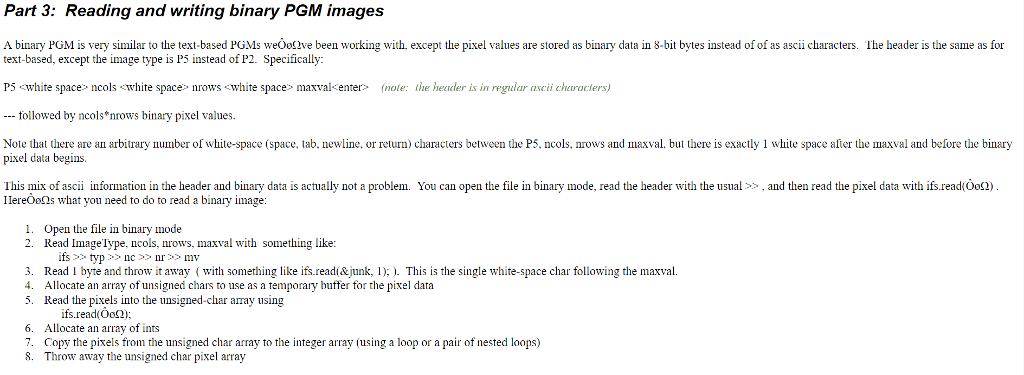
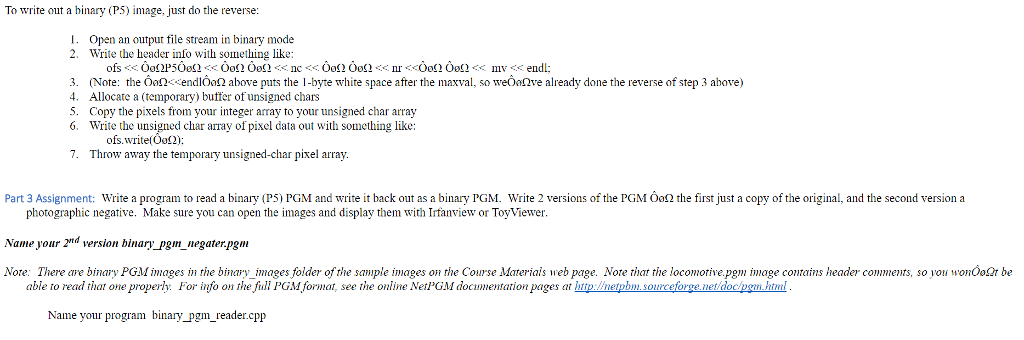
Part 3: Reading and writing binary PGM images A binary PGM is very similar to the text-based PGMs weOe@ve been working with, except the pixel values are stored as binary data in 8-bit by es instead of ofas ascii characters. The header is the same as for text-based, except the image type is P5 instead of P2. Specifically: P5 white space ncols "white space n white space maxval enter le: header is in regular asci characters) ollowed by ncols nrows binary pixel va ncols, nrows and al, but there is exactly 1 while space after the maxval and before the b space (space, tab. newline, or relurn) characters between the P5 Note that there are an arbitrary number of w pixel dala begins This mix of ascii information in the header and binary data is actually not a problem. You can open the file in binary mode, read the header with the usual and the read the pixel data with ifs.read(Oos2 Ilereoons what you need to do to read a binary image 1. Open the file in binary mode 2. Read Inagelype, ncols, nrows, maxval with something like ifs typ nc nr mv 3. Read l byte and throw it away (with something like ifs.read(&junk, 1); This is the single white-space char following the maxval. 4. Allocate an array of unsigned chars to use as a temporary buffer for the pixel data 5. Read the pixels into the unsigned-char array using ifs read(Oog2) 6. Allocate an array of ints 7. Copy the pixels from the unsigned char array to the integer array (using a loop or a pair of nested loops) 8. Throw away the unsigned cha pixel array Part 3: Reading and writing binary PGM images A binary PGM is very similar to the text-based PGMs weOe@ve been working with, except the pixel values are stored as binary data in 8-bit by es instead of ofas ascii characters. The header is the same as for text-based, except the image type is P5 instead of P2. Specifically: P5 white space ncols "white space n white space maxval enter le: header is in regular asci characters) ollowed by ncols nrows binary pixel va ncols, nrows and al, but there is exactly 1 while space after the maxval and before the b space (space, tab. newline, or relurn) characters between the P5 Note that there are an arbitrary number of w pixel dala begins This mix of ascii information in the header and binary data is actually not a problem. You can open the file in binary mode, read the header with the usual and the read the pixel data with ifs.read(Oos2 Ilereoons what you need to do to read a binary image 1. Open the file in binary mode 2. Read Inagelype, ncols, nrows, maxval with something like ifs typ nc nr mv 3. Read l byte and throw it away (with something like ifs.read(&junk, 1); This is the single white-space char following the maxval. 4. Allocate an array of unsigned chars to use as a temporary buffer for the pixel data 5. Read the pixels into the unsigned-char array using ifs read(Oog2) 6. Allocate an array of ints 7. Copy the pixels from the unsigned char array to the integer array (using a loop or a pair of nested loops) 8. Throw away the unsigned cha pixel array
Step by Step Solution
There are 3 Steps involved in it

Get step-by-step solutions from verified subject matter experts
 Study Help