







Question: C++ Programming APPENDIX C (Cloud Cover Input Data & Output Requirements) Figure C-1 below provides a sample of the actual contents within the input file
C++ Programming
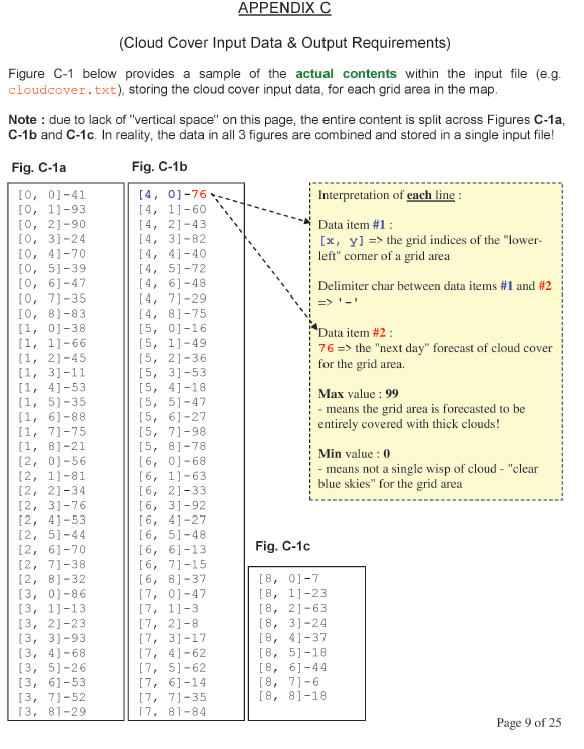
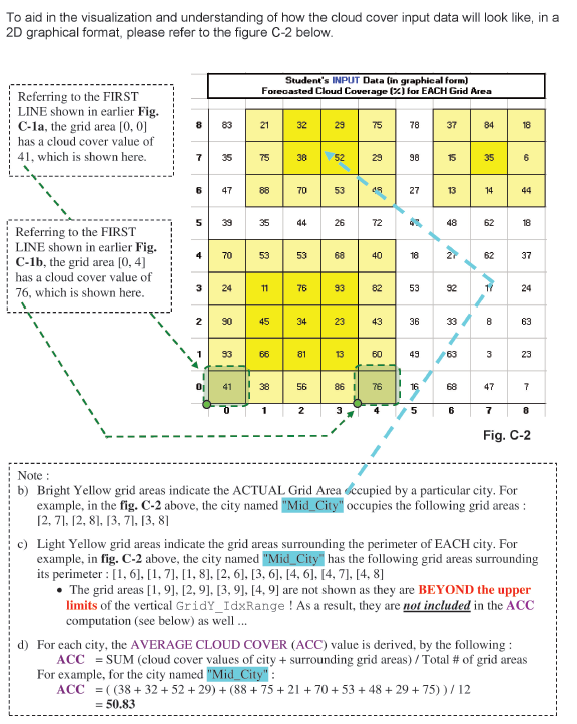
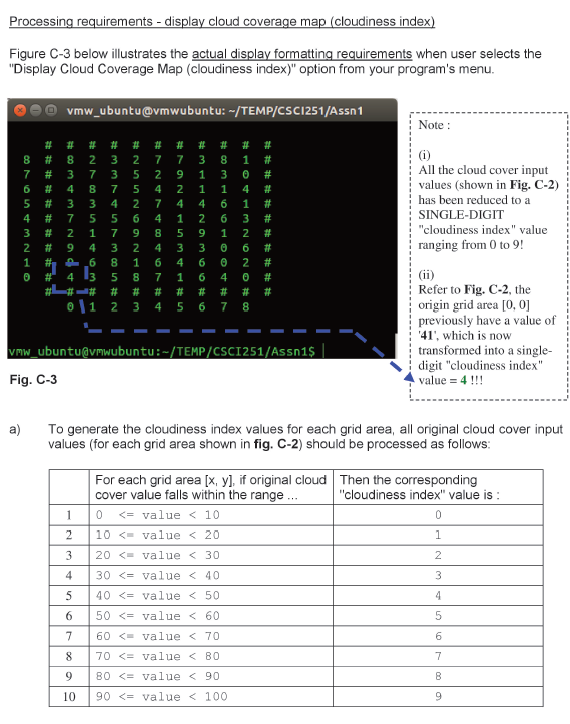
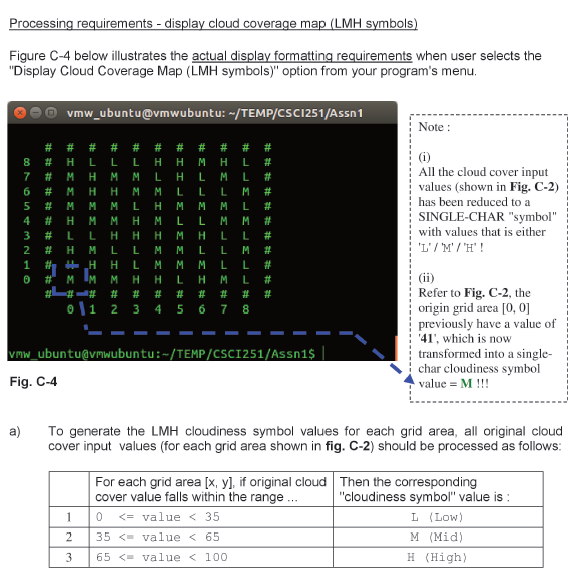
APPENDIX C (Cloud Cover Input Data & Output Requirements) Figure C-1 below provides a sample of the actual contents within the input file (e.g. cloudcover.txt), storing the cloud cover input data, for each grid area in the map. Note: due to lack of "vertical space" on this page, the entire content is split across Figures C-1a, C-1b and C-1c. In reality, the data in all 3 figures are combined and stored in a single input file! Fig. C-1a Fig. C-1b Interpretation of each line: Data item #1 : [x, y] => the grid indices of the lower- left" corner of a grid area Delimiter char between data items #1 and #2 Data item #2 : 76 => the "next day" forecast of cloud cover for the grid area. Max value : 99 - means the grid area is forecasted to be entirely covered with thick clouds! [0,0] -41 [0, 1] -93 [0, 2] -90 [0, 31-24 [0, 4]-70 [0, 5)-39 [0, 6) -47 [0, 71-35 [O, B]-83 [1, 0]-38 [1, 1)-66 [1, 2]-45 [1, 3] -11 [1, 4]-53 [1, 5)-35 [1, 61-88 [1, 7]-75 [1, 8] -21 [2, 01-56 [2, 1]-81 [2, 2]-34 [2, 3] -76 [2, 4]-53 [2, 5] -44 [2, 6]-70 [2, 71-38 [2, B1-32 (3, 0)-86 [3, 1] -13 [3, 2]-23 (3, 3)-93 [3, 4]-68 [3, 5)-26 [3, 6) -53 [3, 71-52 13, 81-29 [4, 0] - 76 [4, 1]-60 [4, 2]-43 [4, 31-82 [4, 4]-40 [4, 5] -72 [4, 6-48 [4, 71-29 [4, 8]-75 [5, 01-16 [5, 1]-49 [5, 21-36 [5, 3]-53 [5, 41-18 [5, 5] -47 [5, 6] -27 [5, 71-98 [5, 8]-78 [6, 0]-68 [6, 1)-63 [6, 2]-33 [6, 3] -92 [6, 41-27 [6, 5] -48 [6, 6]-13 [6, 71-15 [6, 8]-37 [7, 01-47 [7, 1]-3 [7, 2]-8 [7, 3] -17 [7, 41-62 [7, 5] -62 [7, 6] -14 [7, 71-35 17, 81-84 Min value: 0 - means not a single wisp of cloud -"clear blue skies" for the grid area Fig. C-1c [B, 0]-7 [B, 11-23 [B, 2)-63 [8, 31-24 [B, 4]-37 [B, 5] -18 [B, 6] -44 [8, 71-6 [8, 8]-18 Page 9 of 25 To aid in the visualization and understanding of how the cloud cover input data will look like, in a 2D graphical format, please refer to the figure C-2 below. Student's INPUT Data (in graphical form) Forecasted Cloud Coverage (2) for EACH Grid Area Referring to the FIRST LINE shown in earlier Fig. C-la, the grid area [0, 0] has a cloud cover value of 41, which is shown here. 8 83 21 se 2 75 78 37 84 18 7 35 75 38 52 98 15 35 6 6 47 88 70 53 09 27 13 14 44 5 39 35 44 26 72 48 62 18 4 70 53 53 68 40 18 62 37 Referring to the FIRST LINE shown in earlier Fig. C-1b, the grid area [0, 4] has a cloud cover value of 76, which is shown here. 3 24 11 78 93 82 53 92 17 24 2 90 45 34 23 43 36 8 63 93 66 81 13 60 49 63 3 23 41 56 86 76 16 68 47 7 6 1 2 3 5 6 7 8 Fig. C-2 Note: b) Bright Yellow grid areas indicate the ACTUAL Grid Area occupied by a particular city. For example, in the fig. C-2 above, the city named "Mid_City" occupies the following grid areas: 12, 71, 12, 8), (3, 71, [3, 8] c) Light Yellow grid areas indicate the grid areas surrounding the perimeter of EACH city. For example, in fig. C-2 above, the city named "Mid_City has the following grid areas surrounding its perimeter : [1,6],[1, 7],[1, 8], [2,6], [3,6], [4, 6). [4, 7], [4, 8] The grid areas [1,9], [2,9), [3,9], [4,9) are not shown as they are BEYOND the upper limits of the vertical GridY_IdxRange ! As a result, they are not included in the ACC computation (see below) as well ... d) For each city, the AVERAGE CLOUD COVER (ACC) value is derived, by the following: ACC = SUM (cloud cover values of city + surrounding grid areas) / Total # of grid areas For example, for the city named "Mid_City": ACC = ((38 + 32 +52 +29) + (88 + 75 + 21 + 70 +53 +48 + 29 + 75)) / 12 = 50.83 Processing requirements - display cloud coverage map (cloudiness index) Figure C-3 below illustrates the actual display formatting requirements when user selects the "Display Cloud Coverage Map (cloudiness index)" option from your program's menu. vmw_ubuntu@vmwubuntu: -/TEMP/CSC1251/Assn 1 Note : 8 7 5 4 3 2 1 ************ O #APNWW00# Wouw0N* # # # # # # # # # # # # 8 2 3 2 7 7 3 8 1 # 3 7 3 5 2 9 1 3 # 4 8 7 5 4 2 1 1 4 # 3 3 4 2 7 4 4 1 # 7 5 5 6 4 1 2 6 3 # 2 1 7 9 8 5 9 1 2 9 4 3 2 4 3 3 # # 06 8 1 6 4 6 2 # # 4 3 5 8 7 1 6 4 # # # # # # # 3 4 5 6 7 8 IN*UWUWW* # MOOOO #N , (1) All the cloud cover input values (shown in Fig. C-2) has been reduced to a SINGLE-DIGIT "cloudiness index" value ranging from 0 to 9! o\1 2 - - - I - Refer to Fig. C-2, the origin grid area [0, 0] previously have a value of '41', which is now transformed into a single- digit cloudiness index" value = 4 !!! Vmw_ubuntu@mwubuntu:-/TEMP/CSCI251/Assn1$ Fig. C-3 a) To generate the cloudiness index values for each grid area, all original cloud cover input values (for each grid area shown in fig. C-2) should be processed as follows: 1 2 3 For each grid area (x, y), if original cloud Then the corresponding cover value falls within the range ... "cloudiness index" value is: 0
Step by Step Solution
There are 3 Steps involved in it

Get step-by-step solutions from verified subject matter experts
 Study Help