







Question: C# programming Excel export Objective Write a console C# program that will read a data file of names and grades and create a formatted Excel
C# programming Excel export
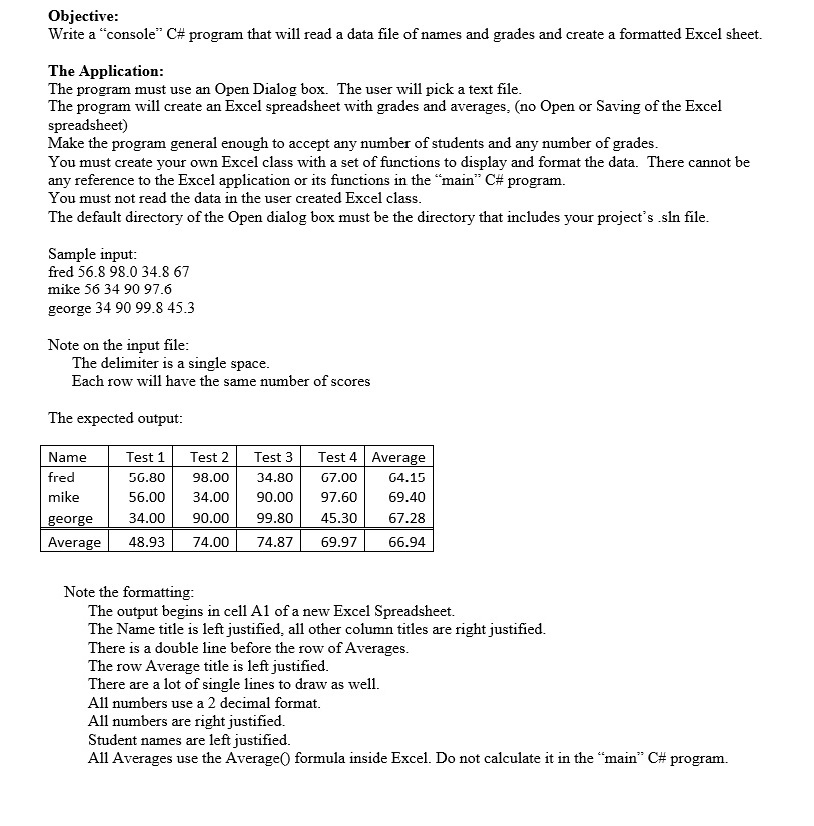
Objective Write a "console" C# program that will read a data file of names and grades and create a formatted Excel sheet. The Application The program must use an Open Dialog box. The user will pick a text file The program will create an Excel spreadsheet with grades and averages, (no Open or Saving of the Excel spreadsheet) Make the program general enough to accept any number of students and any number of grades You must create your own Excel class with a set of functions to display and format the data. There cannot be any reference to the Excel application or its functions in the main, C# program. You must not read the data in the user created Excel class The default directory of the Open dialog box must be the directory that includes your project's .sln file Sample input fred 56.8 98.0 34.8 67 mike 56 34 90 97.6 george 34 90 99.8 45.3 Note on the input file The delimiter is a single space Each row will have the same number of scores The expected output Name fred mike george Average48.93 74.0074.87 69.9766.94 Test 1 Test 2Test 3 Test 4 Average 56.80 98.00 34.80 67.00 4.15 56.0034.00 90.00 97.60 69.40 34.00 90.00 99.80 45.30 67.28 Note the formatting The output begins in cell Al of a new Excel Spreadsheet. The Name title is left justified, all other column titles are right justified. There is a double line before the row of Averages The row Average title is left justified There are a lot of single lines to draw as well. All numbers use a 2 decimal format. All numbers are right justified. Student names are left justified All Averages use the Average() formula inside Excel. Do not calculate it in the main C# program. Objective Write a "console" C# program that will read a data file of names and grades and create a formatted Excel sheet. The Application The program must use an Open Dialog box. The user will pick a text file The program will create an Excel spreadsheet with grades and averages, (no Open or Saving of the Excel spreadsheet) Make the program general enough to accept any number of students and any number of grades You must create your own Excel class with a set of functions to display and format the data. There cannot be any reference to the Excel application or its functions in the main, C# program. You must not read the data in the user created Excel class The default directory of the Open dialog box must be the directory that includes your project's .sln file Sample input fred 56.8 98.0 34.8 67 mike 56 34 90 97.6 george 34 90 99.8 45.3 Note on the input file The delimiter is a single space Each row will have the same number of scores The expected output Name fred mike george Average48.93 74.0074.87 69.9766.94 Test 1 Test 2Test 3 Test 4 Average 56.80 98.00 34.80 67.00 4.15 56.0034.00 90.00 97.60 69.40 34.00 90.00 99.80 45.30 67.28 Note the formatting The output begins in cell Al of a new Excel Spreadsheet. The Name title is left justified, all other column titles are right justified. There is a double line before the row of Averages The row Average title is left justified There are a lot of single lines to draw as well. All numbers use a 2 decimal format. All numbers are right justified. Student names are left justified All Averages use the Average() formula inside Excel. Do not calculate it in the main C# program
Step by Step Solution
There are 3 Steps involved in it

Get step-by-step solutions from verified subject matter experts
 Study Help