







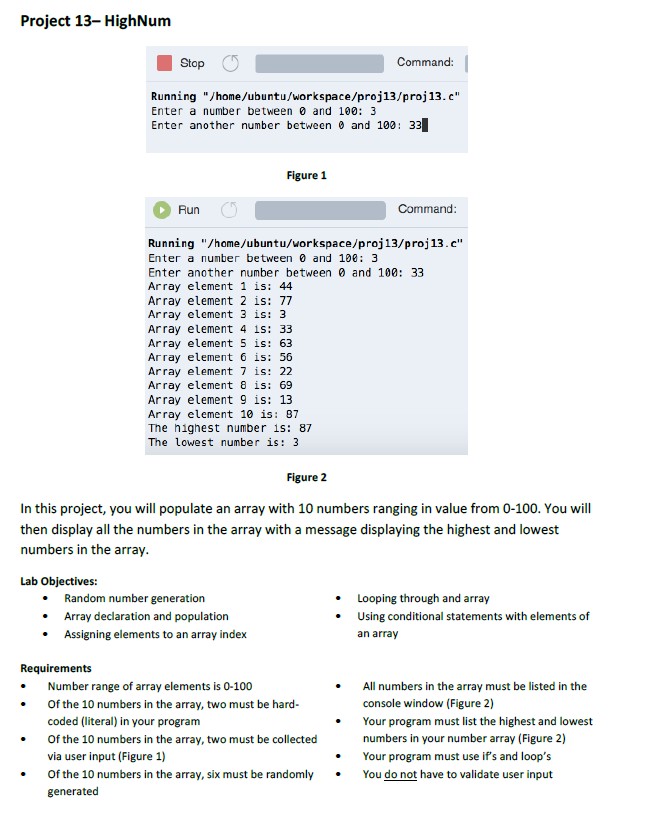
Question: c programming Project 13- HighNum Stop Command: Running /home/ubuntu/workspace/proj13/proj13.c Enter a number between and 100: 3 Enter another number between and 100: 33 Figure 1
c programming
Project 13- HighNum Stop Command: Running "/home/ubuntu/workspace/proj13/proj13.c" Enter a number between and 100: 3 Enter another number between and 100: 33 Figure 1 Run Command Running "/home/ubuntu/workspace/proj13/proj13.c" Enter a number between 0 and 100: 3 Enter another number between0 and 100: 33 Array element 1 is: 44 Array element 2 is: 77 Array element 3 is: 3 Array element 4 1s: 33 Array element 5 is: 63 Array element 6 i5: 56 Array element 7 is: 22 Array element 8 is: 69 Array element 9 is: 13 Array element 10 is: 87 The highest number is: 87 The lowest number is: 3 Figure 2 In this project, you will populate an array with 10 numbers ranging in value from 0-100. You will then display all the numbers in the array with a message displaying the highest and lowest numbers in the array Lab Objectives: Random number generation Array declaration and population Assigning elements to an array index Looping through and array Using conditional statements with elements of an array . Requirements Number range of array elements is 0-100 Of the 10 numbers in the array, two must be hard- coded (literal) in your program Of the 10 numbers in the array, two must be collected via user input (Figure 1) All numbers in the array must be listed in the console window (Figure 2) Your program must list the highest and lowest numbers in your number array (Figure 2) . Your program must use if's and loop's Of the 10 numbers in the array, six must be randomly You do not have to validate user input generated
Step by Step Solution
There are 3 Steps involved in it

Get step-by-step solutions from verified subject matter experts
 Study Help