







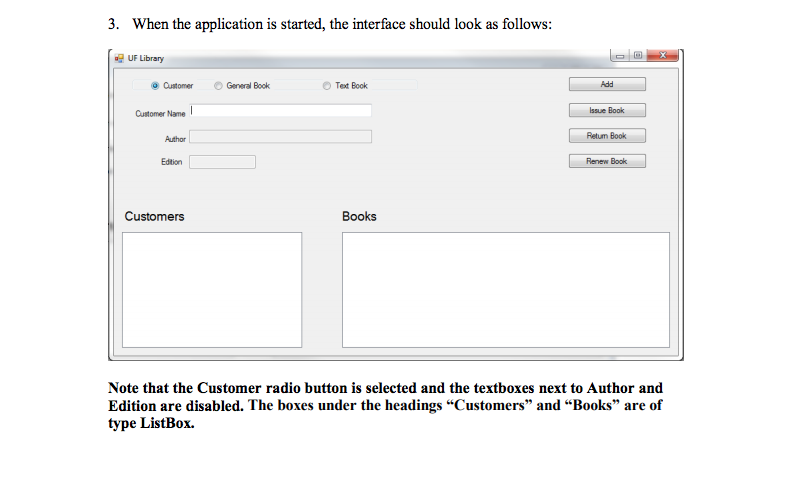
Question: C# Windows Form App 3. When the application is started, the interface should look as follows: UF Librany CustomerGeeral Book Tet Book Add Customer Name
C#
Windows Form App
3. When the application is started, the interface should look as follows: UF Librany CustomerGeeral Book Tet Book Add Customer Name Issue Book Author Retum Book Edtion Renew Book Customers Books Note that the Customer radio button is selected and the textboxes next to Author and Edition are disabled. The boxes under the headings "Customers" and "Books" are of type ListBox. 3. When the application is started, the interface should look as follows: UF Librany CustomerGeeral Book Tet Book Add Customer Name Issue Book Author Retum Book Edtion Renew Book Customers Books Note that the Customer radio button is selected and the textboxes next to Author and Edition are disabled. The boxes under the headings "Customers" and "Books" are of type ListBox
Step by Step Solution
There are 3 Steps involved in it

Get step-by-step solutions from verified subject matter experts
 Study Help