







Question: Can I get help with this: I was able to create a directory called /Labs/chap4/ your-last-name under /root directory, then cd to /root/Labs/chap4 but no
Can I get help with this: I was able to create a directory called /Labs/chap4/your-last-name under /root directory, then cd to /root/Labs/chap4 but no understanding when it gets to part 3.
ITSC 1307 Unix
Chapter 4 Lab Part 2
In this lab, you will use what you learned from Chapter 4 to complete this exercise.
1) Using your VM login using the root account
2) Create a directory called /Labs/chap4/your-last-name under /root directory, then cd to /root/Labs/chap4.
3) Create a directory and file structure as follows using mkdir to create the directories and touch to create the files. Note the directory names, file names, and permissions. Your structure should look identical. Ive also included a long listing of the structure below the screenshot. View your structure from Labs/chap4 using:
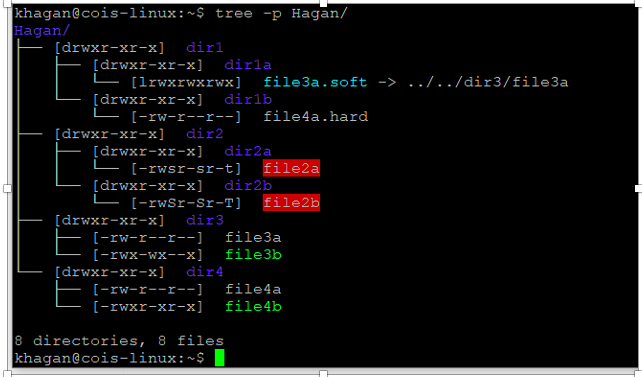
cd ~/Labs/chap4 (this is to make sure youre in the /root/Labs/chap4 directory
tree -p your-last-name ls -lR your-last-name
4) When you have finished run the following two commands from your /root/Labs/chap4 directory to create 2 txt files:
tree -p your-last-name > your-last-name-tree.txt ls -l -R your-last-name > your-last-name-list.txt
5) I will show you how to upload the 2 txt files to your host.
Tree View (make sure youre in /root/Labs/chap4)
khagan@cois-linux:~$ tree -p Hagan/ Hagan/ [drwxr-xr-x] diri [drwxr-xr-x] dirla L [lrwxrwxrwx] file3a.soft -> ../../dir3/file3a [drwxr-xr-x] dirlb L [-rw-r--r--] file4a.hard [drwxr-xr-x] dir2 [drwxr-xr-x] dir2a L [-rwsr-sr-t] file2a [drwxr-xr-x dir2b L[-rwSr-Sr-T] file2b [drwxr-xr-x] dir3 [-rw-r--r--] file3a [-rwx-wx--x] file3b [drwxr-xr-x] dir4 [-rw-r--r--] file4a [-rwxr-xr-x] file4b 8 directories, 8 files khagan@cois-linux:~$
Step by Step Solution
There are 3 Steps involved in it

Get step-by-step solutions from verified subject matter experts
 Study Help