







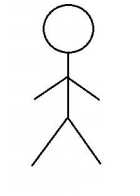
Question: Can Someone draw this image using Processing? 1) Set the window size as 600 by 600; (2) Set global variables x and y as the
Can Someone draw this image using Processing?
1) Set the window size as 600 by 600;
(2) Set global variables x and y as the center of the head, and draw the rest of the body parts relative to the head position (x and y) - use one function named as drawStickFigure to draw the stick figure on the screen with position x and y; and draw the rest of the body parts using separate functions (methods) for drawing each part of the stick figure (e.g. head, body, arm);
(3) Set random color to the stick figure for each frame.
(4) Use variables, bouncing-ball example, and the trigonometry we discussed in class to create walking back-and-forth animation of the stick figure. (Hints: two legs movement can be animated using trigonometry; while walking back and forth across screen can be done by setting conditions for position x).
Step by Step Solution
There are 3 Steps involved in it

Get step-by-step solutions from verified subject matter experts
 Study Help