







Question: Can someone please help me with Linux/Unix? To answer the following questions, you have to include: The text or screen-shots of command(s) that you type
Can someone please help me with Linux/Unix?
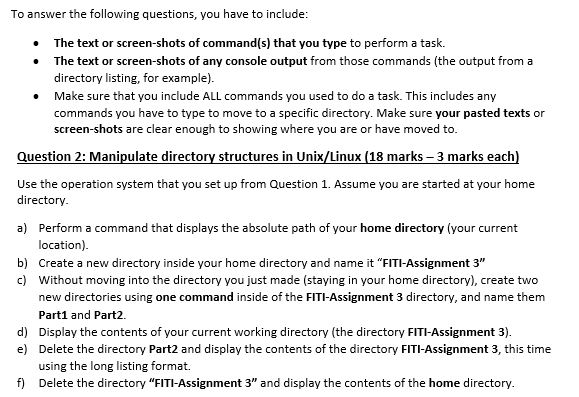
To answer the following questions, you have to include: The text or screen-shots of command(s) that you type to perform a task. . The text or screen-shots of any console output from those commands (the output from a directory listing, for example). Make sure that you include ALL commands you used to do a task. This includes any commands you have to type to move to a specific directory. Make sure your pasted texts or screen-shots are clear enough to showing where you are or have moved to. Question 2: Manipulate directory structures in Unix/Linux (18 marks-3 marks each) Use the operation system that you set up from Question 1. Assume you are started at your home directory a) Perform a command that displays the absolute path of your home directory (your current location). Create a new directory inside your home directory and name it "FITI-Assignment 3" Without moving into the directory you just made (staying in your home directory), create two new directories using one command inside of the FITI-Assignment 3 directory, and name them Part1 and Part2. b) c) d) Display the contents of your current working directory (the directory FITI-Assignment 3). e) Delete the directory Part2 and display the contents of the directory FITI-Assignment 3, this time using the long listing format. f) Delete the directory "FITI-Assignment 3" and display the contents of the home directory
Step by Step Solution
There are 3 Steps involved in it

Get step-by-step solutions from verified subject matter experts
 Study Help