



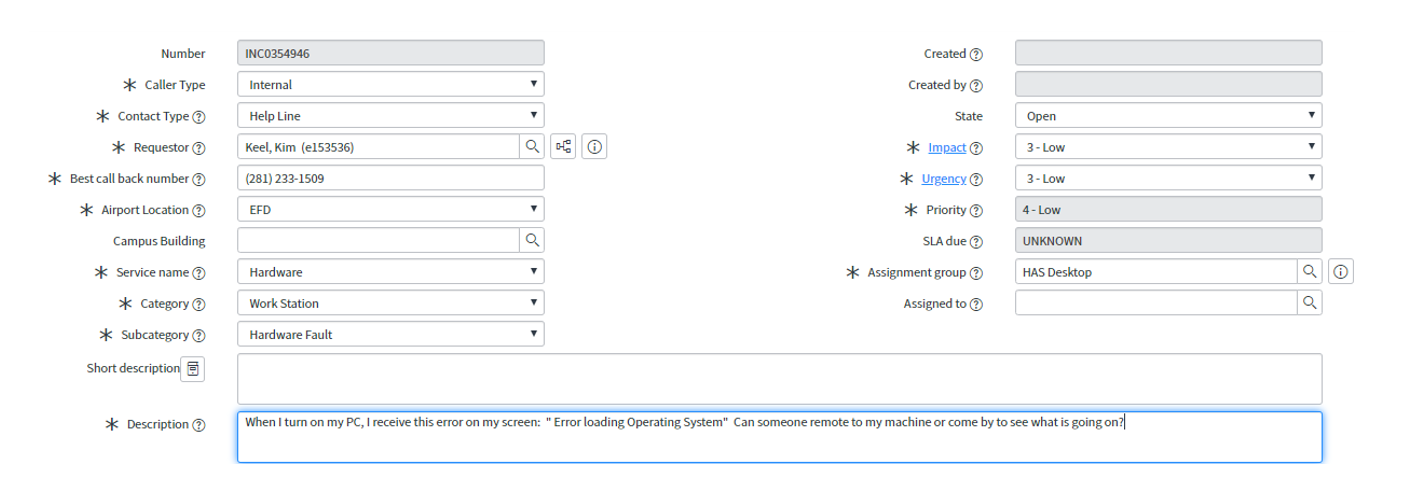
Question: Can someone please help troubleshoot this scenario below by going through the steps? Troubleshooting Process: Create a document that explains what you would do for
Can someone please help troubleshoot this scenario below by going through the steps?
Troubleshooting Process:Create a document that explains what you would do for the first five steps of the troubleshooting process to resolve the issue stated in each ticket.
- The first step in the troubleshooting process is togather information. Explain how you would identify the problems that users most commonly experience and call the IT help desk for, given the scenario.
- To explain how you would identify the problems, you might want to write what questions you would ask to gather the information you need to troubleshoot successfully.
- Since the second step of the troubleshooting process is toidentify what has changed, explain how you would identify what may have changed in the system that may have caused the problems, based on the computing issue.
- Create a hypothesisof what you think the probable causes for the issues are, based on the information gathered in the first step. You may want to come up with several hypotheses.
- Although you are not physically going todetermine the appropriate fixby testing your hypotheses, explain how you would test your hypotheses as a part of the troubleshooting process. You will also want to account for possible ramifications that you could cause by fixing the issue based on your hypotheses.
- Explain how you wouldimplement the fixto verify the cause of the problem if you were the IT support specialist assisting users at the time.
- In some cases, it could be that the IT support specialist had already implemented the fix; explain if you would have handled it similarly or differently.
Step by Step Solution
There are 3 Steps involved in it
1 Expert Approved Answer
Step: 1 Unlock

Question Has Been Solved by an Expert!
Get step-by-step solutions from verified subject matter experts
Step: 2 Unlock
Step: 3 Unlock