







Question: can you do this andriod question D3.3-IMPLEMENTATION roject MCal cPro with activity McalcPro Activity and layout mcal cpro layout Create a D3.3.a -Building the View
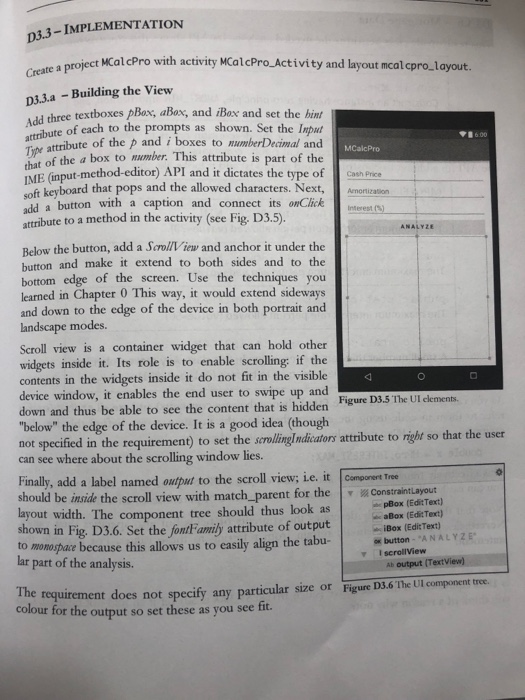
D3.3-IMPLEMENTATION roject MCal cPro with activity McalcPro Activity and layout mcal cpro layout Create a D3.3.a -Building the View d three textboxes pBox, aBox, and iBox and set the hint of each to the prompts as shown. Set the Inpu isx atribute of the p and i boxes to mumberDecimal and attribute 1600 of the a box to mumber. This attribute is part of the IME (input-method-editor) API and it dictates the type of Cash Price oft keyboard that pops and the allowed characters. Next, Amontization add a attribute to a method in the activity (see Fig, D3.5). MCalcPro button with a caption and connect its olk terest Below the button, add a Scroll iew and anchor it under the button and make it extend to both sides and to the bottom edge of the screen. Use the techniques you learned in Chapter 0 This way, it would extend sideways and down to the edge of the device in both portrait and landscape modes. Scroll view is a container widget that can hold other widgets inside it. Its role is to enable scrolling: if the contents in the widgets inside it do not fit in the visible device window, it enables the end user to swipe up and down and thus be able to see the content that is hidden Figure D3.5 The Ul clements "below" the edge of the device. It is a good idea (though not specified in the requirement) to set the scrolingIndicators attribute to right so that the user can see where about the scrolling window lies. Finally, add a label named output to the scroll view; ie. it component Tree should be inside the scroll view with match parent for the ConstraintLayout layout width. epBox (EditText) aBox (Edit Text) iBox (EdicText) The component tree should thus look as shown in Fig. D3.6. Set the fontFamily attribute of output to monospase because this allows us to easily align the tabu-buttorn lar part of the analysis. Ab output (Textview) requirement does not specify any particular size or Figure D3.6 The Ul component tree colour for the output so set these as you see tit. The
Step by Step Solution
There are 3 Steps involved in it

Get step-by-step solutions from verified subject matter experts
 Study Help