







Question: Can you explain step by step on how would this would look like on Sage? Add your full name at the end of the company
Can you explain step by step on how would this would look like on Sage?
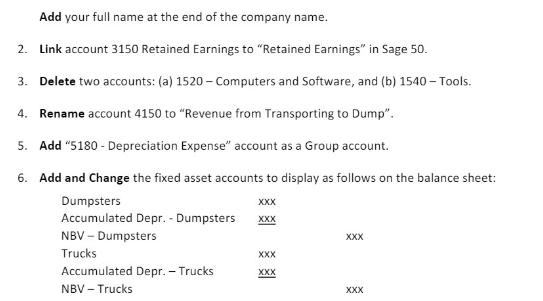
Add your full name at the end of the company name. 2. Link account 3150 Retained Earnings to "Retained Earnings" in Sage 50. 3. Delete two accounts: (a) 1520-Computers and Software, and (b) 1540-Tools. 4. Rename account 4150 to "Revenue from Transporting to Dump". 5. Add "5180 - Depreciation Expense" account as a Group account. 6. Add and Change the fixed asset accounts to display as follows on the balance sheet: Dumpsters XXX Accumulated Depr. - Dumpsters XXX NBV - Dumpsters Trucks Accumulated Depr. - Trucks NBV - Trucks XXX XXX XXX XXX
Step by Step Solution
3.24 Rating (145 Votes )
There are 3 Steps involved in it
To perform these tasks in Sage 50 you would typically follow these steps Link Account 3150 Retained ... View full answer

Get step-by-step solutions from verified subject matter experts
 Study Help