







Question: Can you help me display what a 32 bit adder would look like? Preferbly using the program linked in the question. Thank you. For this
Can you help me display what a 32 bit adder would look like? Preferbly using the program linked in the question.
Thank you.
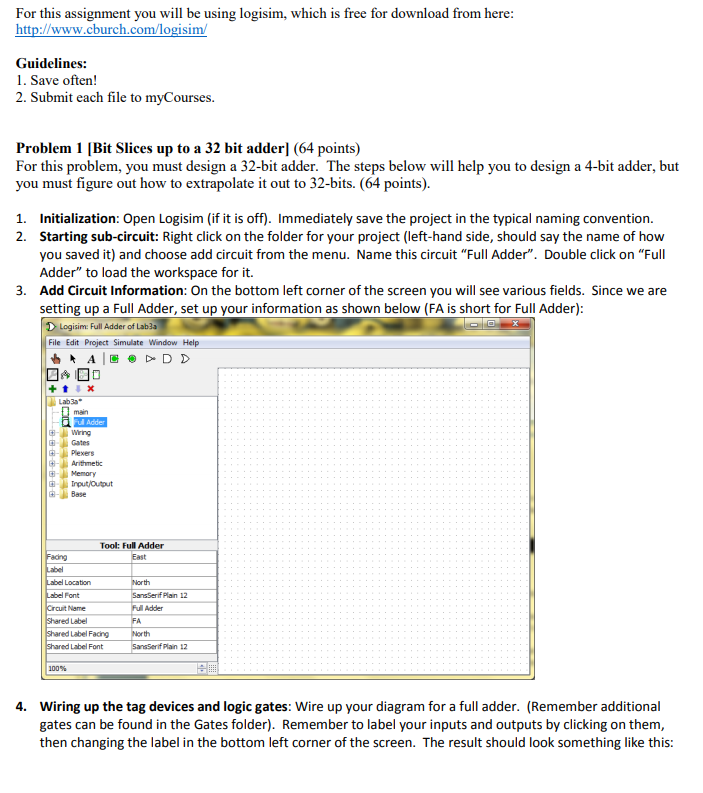
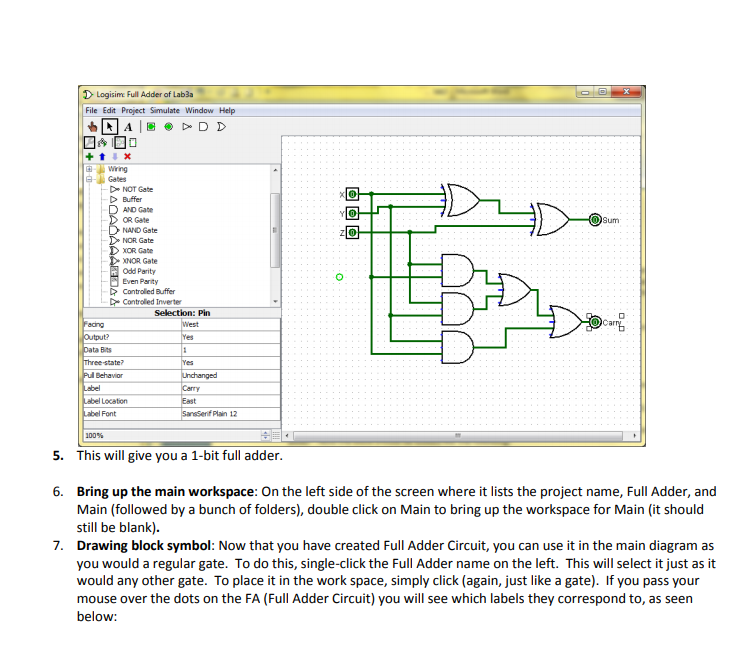
For this assignment you will be using logisim, which is free for download from here http://www.cburch.com/logisim Guidelines: 1. Save often! 2. Submit each file to myCourses Problem 1 IBit Slices up to a 32 bit adderl (64 points) For this problem, you must design a 32-bit adder. The steps below will help you to design a 4-bit adder, but you must figure out how to extrapolate it out to 32-bits. (64 points). Initialization: Open Logisim (if it is off). Immediately save the project in the typical naming convention. Starting sub-circuit: Right click on the folder for your project (left-hand side, should say the name of how you saved it) and choose add circuit from the menu. Name this circuit "Full Adder". Double click on "Full Adder" to load the workspace for it. Add Circuit Information: On the bottom left corner of the screen you will see various fields. Since we are setting up a Full Adder, set up your information as shown below (FA is short for Full Adder) 1. 2. 3. Logisim: Full Adder of Lab3a File Edit Project Simulate Window main Wiring Gates Plexers Arithmebic Memory Irput/outout Base Tool: Full Adder Font Plain 12 Adder Label Label Facrg Label Font Plain 12 Wiring up the tag devices and logic gates: Wire up your diagram for a full adder. (Remember additional gates can be found in the Gates folder). Remember to label your inputs and outputs by clicking on them, then changing the label in the bottom left corner of the screen. The result should look something like this: 4
Step by Step Solution
There are 3 Steps involved in it

Get step-by-step solutions from verified subject matter experts
 Study Help