



Question: Can you help me? Not sure what additional information you need to answer this. I am a college student taking an INTRODUCTORY OS scripting course
Can you help me? Not sure what additional information you need to answer this.
I am a college student taking an INTRODUCTORY OS scripting course (Windows 10 OS) and need your help.
Thanks.
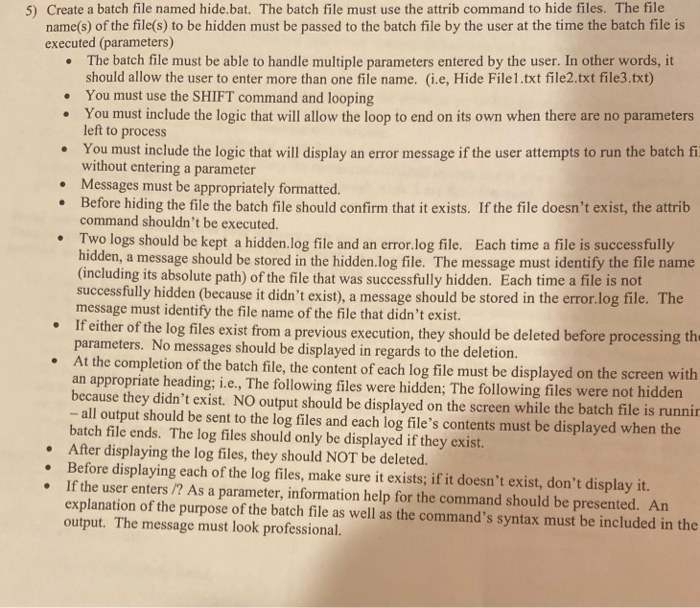
5) Create a batch file named hide.bat. The batch file must use the attrib command to hide files. The file name(s) of the file(s) to be hidden must be passed to the batch file by the user at the time the batch file is executed (parameters) The batch file must be able to handle multiple parameters entered by the user. In other words, it should allow the user to enter more than one file name. (i.e, Hide Filel.txt file2.txt file3.txt) You must use the SHIFT command and looping You must include the logic that will allow the loop to end on its own when there are no parameters left to process You must include the logic that will display an error message if the user attempts to run the batch fi without entering a parameter Messages must be appropriately formatted. Before hiding the file the batch file should confirm that it exists. If the file doesn't exist, the attrib command shouldn't be executed. Two logs should be kept a hidden log file and an error.log file. Each time a file is successfully hidden, a message should be stored in the hidden log file. The message must identify the file name (including its absolute path of the file that was successfully hidden. Each time a file is not successfully hidden (because it didn't exist), a message should be stored in the error.log file. The message must identify the file name of the file that didn't exist. If either of the log files exist from a previous execution, they should be deleted before processing the parameters. No messages should be displayed in regards to the deletion. At the completion of the batch file, the content of each log file must be displayed on the screen with an appropriate heading; i.e., The following files were hidden; The following files were not hidden because they didn't exist. NO output should be displayed on the screen while the batch file is runnir -- all output should be sent to the log files and each log file's contents must be displayed when the batch file ends. The log files should only be displayed if they exist. After displaying the log files, they should NOT be deleted. Before displaying each of the log files, make sure it exists; if it doesn't exist, don't display it. If the user enters /? As a parameter, information help for the command should be presented. An explanation of the purpose of the batch file as well as the command's syntax must be included in the output. The message must look professional. 5) Create a batch file named hide.bat. The batch file must use the attrib command to hide files. The file name(s) of the file(s) to be hidden must be passed to the batch file by the user at the time the batch file is executed (parameters) The batch file must be able to handle multiple parameters entered by the user. In other words, it should allow the user to enter more than one file name. (i.e, Hide Filel.txt file2.txt file3.txt) You must use the SHIFT command and looping You must include the logic that will allow the loop to end on its own when there are no parameters left to process You must include the logic that will display an error message if the user attempts to run the batch fi without entering a parameter Messages must be appropriately formatted. Before hiding the file the batch file should confirm that it exists. If the file doesn't exist, the attrib command shouldn't be executed. Two logs should be kept a hidden log file and an error.log file. Each time a file is successfully hidden, a message should be stored in the hidden log file. The message must identify the file name (including its absolute path of the file that was successfully hidden. Each time a file is not successfully hidden (because it didn't exist), a message should be stored in the error.log file. The message must identify the file name of the file that didn't exist. If either of the log files exist from a previous execution, they should be deleted before processing the parameters. No messages should be displayed in regards to the deletion. At the completion of the batch file, the content of each log file must be displayed on the screen with an appropriate heading; i.e., The following files were hidden; The following files were not hidden because they didn't exist. NO output should be displayed on the screen while the batch file is runnir -- all output should be sent to the log files and each log file's contents must be displayed when the batch file ends. The log files should only be displayed if they exist. After displaying the log files, they should NOT be deleted. Before displaying each of the log files, make sure it exists; if it doesn't exist, don't display it. If the user enters /? As a parameter, information help for the command should be presented. An explanation of the purpose of the batch file as well as the command's syntax must be included in the output. The message must look professional
Step by Step Solution
There are 3 Steps involved in it

Get step-by-step solutions from verified subject matter experts