







Question: I am a college student taking an INTRODUCTORY OS Scripting course (Windows 10) and need some help with my batch file I am creating for
I am a college student taking an INTRODUCTORY OS Scripting course (Windows 10) and need some help with my batch file I am creating for an assignment.
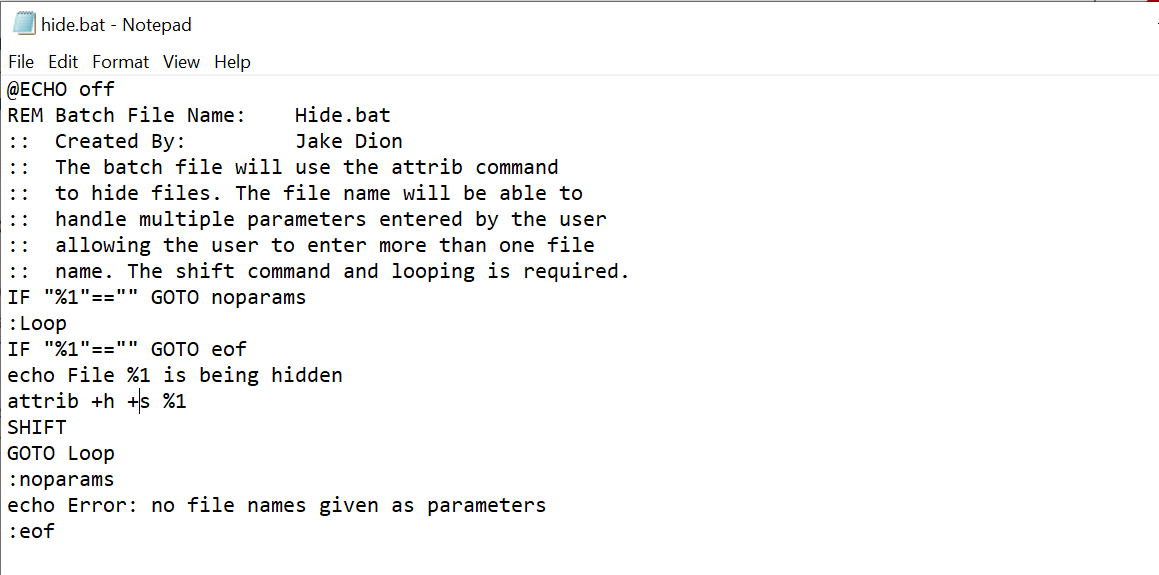
I am using the Attrib command to hide files and the shift command and looping so the user can enter as many files as they want in order to hide files.
I need help with the exact command that will confirm that the file or files exist. If the file doesn't exist, the attrib command shouldn't be executed.
SEE BELOW THE BATCH FILE CREATED
PLEASE INDICATE IN YOUR ANSWER THE EXACT COMMAND AND WHERE TO INSERT IN MY BATCH FILE.
 Thanks for your help!
hide.bat - Notepad File Edit Format View Help @ECHO off REM Batch File Name: Hide.bat :: Created By: Jake Dion :: The batch file will use the attrib command :: to hide files. The file name will be able to :: handle multiple parameters entered by the user allowing the user to enter more than one file :: name. The shift command and looping is required. IF "%1"=="" GOTO noparams : Loop IF "%1"=="" GOTO eof echo File %1 is being hidden attrib +h+ %1 SHIFT GOTO Loop :noparams echo Error: no file names given as parameters :eof
Step by Step Solution
There are 3 Steps involved in it

Get step-by-step solutions from verified subject matter experts
 Study Help