







Question: I am a college student taking an INTRODUCTORY OS Scripting course (Windows 10). I need some help with my batch file I am creating for
I am a college student taking an INTRODUCTORY OS Scripting course (Windows 10). I need some help with my batch file I am creating for homework.
See below the batch file I created.
If the user does not exist, I need to display a message.
Can you please use a simple command and message and tell me where EXACTLY to insert it into the script.
Thank you.
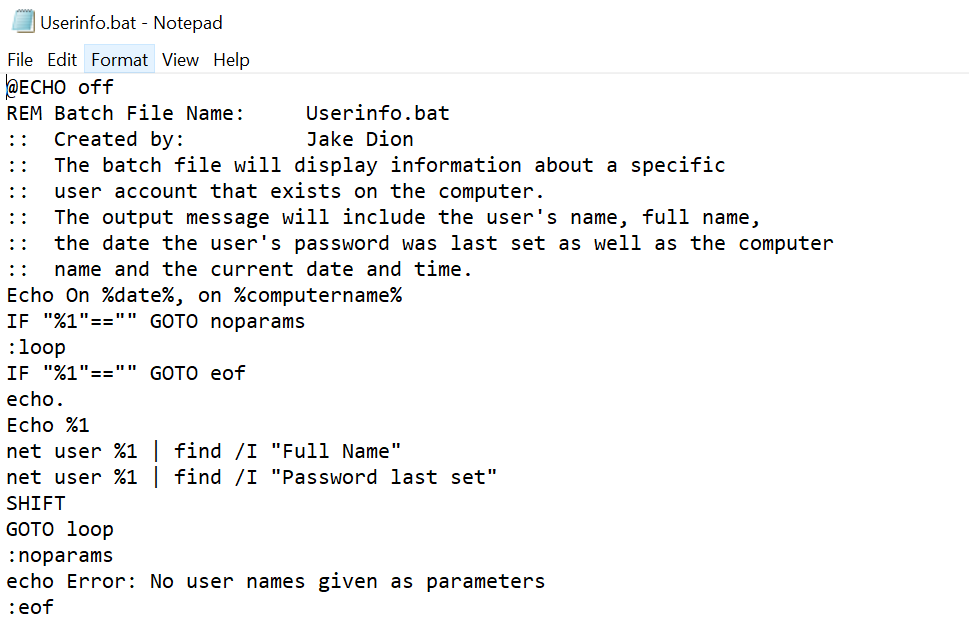
Userinfo.bat - Notepad File Edit Format View Help WECHO off REM Batch File Name: Userinfo.bat :: Created by: Jake Dion :: The batch file will display information about a specific :: user account that exists on the computer. :: The output message will include the user's name, full name, :: the date the user's password was last set as well as the computer :: name and the current date and time. Echo On %date%, on %computername% IF "%1"=="" GOTO noparams :loop IF "%1"=="" GOTO eof echo. Echo %1 net user %1 find /I "Full Name" net user %1 find /I "Password last set" SHIFT GOTO loop :noparams echo Error: No user names given as parameters :eof Userinfo.bat - Notepad File Edit Format View Help WECHO off REM Batch File Name: Userinfo.bat :: Created by: Jake Dion :: The batch file will display information about a specific :: user account that exists on the computer. :: The output message will include the user's name, full name, :: the date the user's password was last set as well as the computer :: name and the current date and time. Echo On %date%, on %computername% IF "%1"=="" GOTO noparams :loop IF "%1"=="" GOTO eof echo. Echo %1 net user %1 find /I "Full Name" net user %1 find /I "Password last set" SHIFT GOTO loop :noparams echo Error: No user names given as parameters :eof
Step by Step Solution
There are 3 Steps involved in it

Get step-by-step solutions from verified subject matter experts
 Study Help