







Question: can you help me plesse Assignment Instructions Use arrow knys to scroll the content Step Instructions 1 Start Accoss. Open the downloaded Access file named
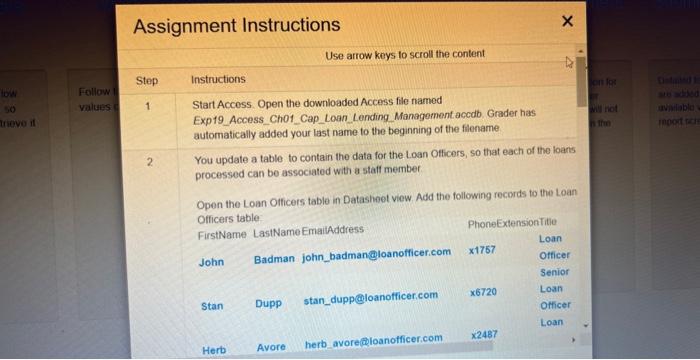
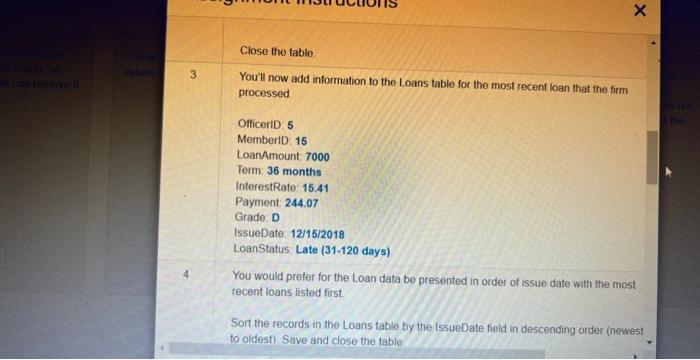
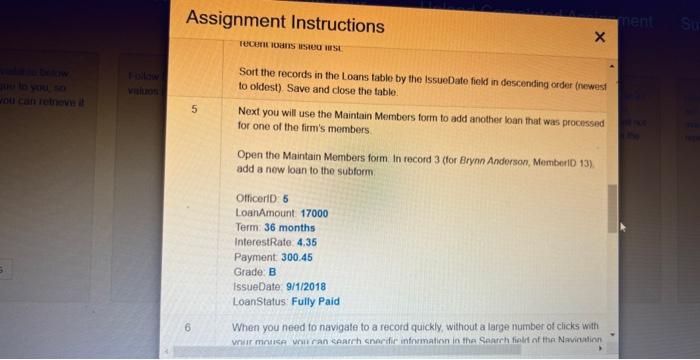
Assignment Instructions Use arrow knys to scroll the content Step Instructions 1 Start Accoss. Open the downloaded Access file named Exp19_Access_Ch01_Cap_Loan_Lending_Managomentaccdb. Grader has automatically added your last name to the beginning of the fllename: You'll now add information to the Loans table for the most recent loan that the firm processed OfficeriD: 5 MemberiD: 15 LoanAmount 7000 Term: 36 months InterestRate: 15.41 Payment: 244.07 Grade: D IssueDate: 12/15/2018 LoanStatus: Late (31-120 days) 4 You would prefer for the Loan data be presented in order of issue date with the most recent loans listed first. Sort the records in the Loans table by the IssueDate fieid in descending order (newest. to oldestl. Save and close the table fecern itads sae0 uss Sort the records in the Loans table by the IssueDate fiekd in descending order thewest to oldest) Save and close the table. Next you will use the Maintain Members form to add another loan that was procissed for one of the firm's members. Open the Maintain Members form In record 3 (for Brynn Anderson, MemberiD 13) add a new loan to the subform OfficeriD: 5 LoanAmount. 17000 Term: 36 months InterestRate. 4.35 Payment: 300.45 Grade: B IssueDate: 9/1/2018 Loanstatus: Fully Paid 6 When you need to navigate to a record quickly, without a large number of chicks with vnur minuse uniu ran caarrh enerifir information in tha Searrh fipli of the Navination - Assignment Instructions Use arrow knys to scroll the content Step Instructions 1 Start Accoss. Open the downloaded Access file named Exp19_Access_Ch01_Cap_Loan_Lending_Managomentaccdb. Grader has automatically added your last name to the beginning of the fllename: You'll now add information to the Loans table for the most recent loan that the firm processed OfficeriD: 5 MemberiD: 15 LoanAmount 7000 Term: 36 months InterestRate: 15.41 Payment: 244.07 Grade: D IssueDate: 12/15/2018 LoanStatus: Late (31-120 days) 4 You would prefer for the Loan data be presented in order of issue date with the most recent loans listed first. Sort the records in the Loans table by the IssueDate fieid in descending order (newest. to oldestl. Save and close the table fecern itads sae0 uss Sort the records in the Loans table by the IssueDate fiekd in descending order thewest to oldest) Save and close the table. Next you will use the Maintain Members form to add another loan that was procissed for one of the firm's members. Open the Maintain Members form In record 3 (for Brynn Anderson, MemberiD 13) add a new loan to the subform OfficeriD: 5 LoanAmount. 17000 Term: 36 months InterestRate. 4.35 Payment: 300.45 Grade: B IssueDate: 9/1/2018 Loanstatus: Fully Paid 6 When you need to navigate to a record quickly, without a large number of chicks with vnur minuse uniu ran caarrh enerifir information in tha Searrh fipli of the Navination
Step by Step Solution
There are 3 Steps involved in it

Get step-by-step solutions from verified subject matter experts
 Study Help