







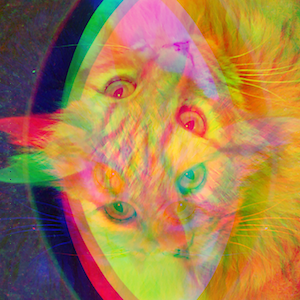
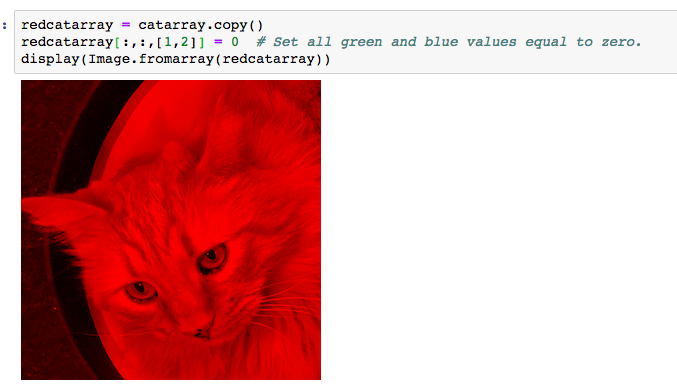
Question: cat = Image.open('meowp.png') display(cat) 1) need help in PYTHON to Flip the blue and green cat-images, so that they match the orientation of the red
cat = Image.open('meowp.png') display(cat)
![the red image. Hint: remember that L[-1::-1]reversed a list. Try this syntax](https://dsd5zvtm8ll6.cloudfront.net/si.experts.images/questions/2024/09/66f65ba480845_34866f65ba400bdd.jpg)
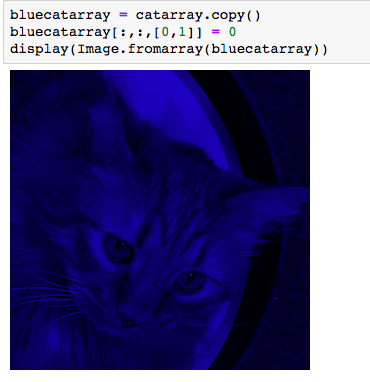
1) need help in PYTHON to Flip the blue and green cat-images, so that they match the orientation of the red image.
Hint: remember that L[-1::-1]reversed a list. Try this syntax with the NumPy arrays! Watch your x- and y- axis reversal!
2) Also Assemble the three properly oriented images (match the orientation of the red image) to assemble a complete RGB kitty.
Can you assemble the image without using any loops?
(PYTHON)
Step by Step Solution
There are 3 Steps involved in it
1 Expert Approved Answer
Step: 1 Unlock

Question Has Been Solved by an Expert!
Get step-by-step solutions from verified subject matter experts
Step: 2 Unlock
Step: 3 Unlock
 Study Help