







Question: CCNA3, Networking Device Interface IP Address Subnet Mask ASBRI GOO SO/0/1 172.16.1.1 209. 165.100.225 172.16.1.2 200.15.1.225 GOO ABR2 S0/00 SO 01 G0/0 200.15.2.225 192.168.1.3 ABR3
CCNA3, Networking
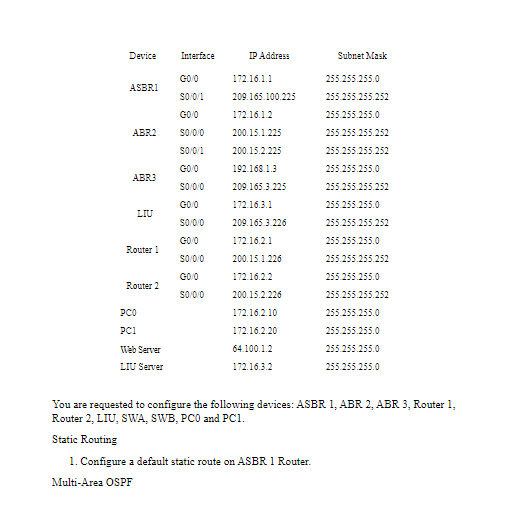
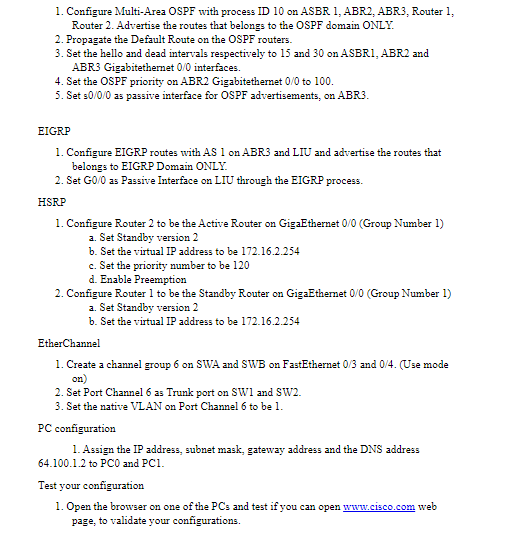
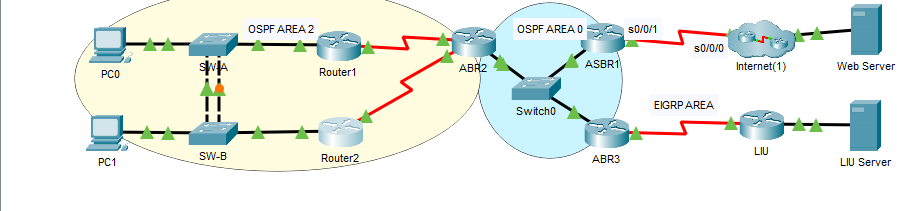
Device Interface IP Address Subnet Mask ASBRI GOO SO/0/1 172.16.1.1 209. 165.100.225 172.16.1.2 200.15.1.225 GOO ABR2 S0/00 SO 01 G0/0 200.15.2.225 192.168.1.3 ABR3 S000 GOO 209.165.3.225 172.16.3.1 209.165.3.226 LIU S0/0/0 GOO 255.255.255.0 255.255.255.252 255.255.255.0 255.255.255.252 255.255.255.252 255.255.255.0 255.255.255.252 255.255.255.0 255.255.255.252 255.255.255.0 255.255.255.252 255.255.255.0 255.255.255.252 255.255.255.0 255.255.255.0 255.255.255.0 255.255.255.0 Router1 S0/0/0 GOO Router 2 S0/0/0 172.16.2.1 200.15.1.226 172.16.2.2 200.15.2.226 172.16.2.10 172.16.2.20 64.100.1.2 PCO PCI Web Server LIU Server 172.16.3.2 You are requested to configure the following devices: ASBR 1, ABR 2. ABR 3. Router 1, Router 2. LIU, SWA, SWB, PCO and PCI. Static Routing 1. Configure a default static route on ASBR 1 Router. Multi-Area OSPF 1. Configure Multi-Area OSPF with process ID 10 on ASBR 1, ABR2, ABR3, Router 1, Router 2. Advertise the routes that belongs to the OSPF domain ONLY. 2. Propagate the Default Route on the OSPF routers. 3. Set the hello and dead intervals respectively to 15 and 30 on ASBRI ABR2 and ABR3 Gigabitethernet 0/0 interfaces. 4. Set the OSPF priority on ABR2 Gigabitethemet 0/0 to 100. 5. Set 30/0/0 as passive interface for OSPF advertisements, on ABR3. EIGRP 1. Configure EIGRP routes with AS I on ABR3 and LIU and advertise the routes that belongs to EIGRP Domain ONLY. 2. Set GO/O as Passive Interface on LIU through the EIGRP process. HSRP 1. Configure Router 2 to be the Active Router on GigaEthernet 0/0 (Group Number 1) a. Set Standby version 2 b. Set the virtual IP address to be 172.16.2.254 c. Set the priority number to be 120 d. Enable preemption 2. Configure Router 1 to be the Standby Router on GigaEthemet 0/0 (Group Number 1) a. Set Standby version 2 b. Set the virtual IP address to be 172.16.2.254 EtherChannel 1. Create a channel group 6 on SWA and SWB on FastEthernet 0/3 and 0/4. (Use mode on) 2. Set Port Channel 6 as Trunk port on SW1 and SW2. 3. Set the native VLAN on Port Channel 6 to be l. PC configuration 1. Assign the IP address, subnet mask, gateway address and the DNS address 64.100.1.2 to PCO and PCI. Test your configuration 1. Open the browser on one of the PCs and test if you can open www.cisco.com web page, to validate your configurations. OSPF AREA 2 OSPF AREA 0 30/0/1 30/0/0 PCO SW ASBR1 Router1 ABRZ Internet(1) Web Server Switcho EIGRP AREA LIU PC1 SW-B Router2 ABR3 LIU Server
Step by Step Solution
There are 3 Steps involved in it

Get step-by-step solutions from verified subject matter experts
 Study Help