







Question: Change the code below to ensure is has NO use of a Scanner or System.out.println. The code should ONLY use JOptionPane. The code should start
Change the code below to ensure is has NO use of a Scanner or System.out.println. The code should ONLY use JOptionPane. The code should start with
import javax.swing.JOptionPane;
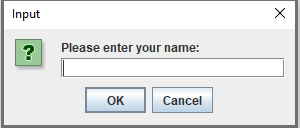
All inputs should be displayed in dialog boxes like this (refer to the dialog box above). All outputs should be displayed in dialog boxes as well. Nothing should be displayed in Run I/O!
Please make sure to follow the instructions above!
import java.util.Scanner;
public class DiscountCalculator {
private static Scanner scanner = new Scanner(System.in);
public static void main(String[] args) {
boolean repeat;
String rating;
int policy;
double premium, rebate =0, net;
do {
policy = getPolicyYears();
premium = getPremiumAmount();
if(policy>3){
rating = getRating();
rebate = getDiscount(premium, policy, rating);
net = premium - rebate;
System.out.println("Policy Tenure : "+ policy);
System.out.println("Rating : " + rating);
System.out.printf("Premium Amount : $ %10.2f ",premium);
if(net!=0) {
System.out.printf("Discount Amount : $ %10.2f ",rebate);
System.out.printf("Net Premium Amount : $ %10.2f ",net);
}
}else{
System.out.println("Policy Tenure : "+ policy);
System.out.printf("Premium Amount : $ %10.2f ",premium);
System.out.println("Info *** you are not eligible for any discount ***");
}
System.out.println(" ");
repeat = repeat();
} while (repeat);
}
public static String getRating() {
String rating;
while (true) {
System.out.print("Enter rating \'Excellent\' or \'Above Average\' or \'Average\': ");
rating = scanner.nextLine();
if (rating.equals("Excellent")) break;
else if (rating.equals("Above Average")) break;
else if (rating.equals("Average")) break;
else {
System.out.println("Error: Invalid rating entered.");
}
}
return rating;
}
public static double getPremiumAmount() {
double premium = 0;
do {
try {
System.out.print("Enter premium amount: ");
String input = scanner.nextLine();
premium = Double.parseDouble(input);
} catch (NumberFormatException e) {
System.out.println("Error: Invalid number");
premium = 0;
}
} while (premium
return premium;
}
public static int getPolicyYears() {
int policy = 0;
do {
try {
System.out.print("Enter the number of years policy policy: ");
String input = scanner.nextLine();
policy = Integer.parseInt(input);
} catch (NumberFormatException e) {
System.out.println("Error: Invalid number");
policy = 0;
}
} while (policy
return policy;
}
public static double getDiscount(double premium, int years, String rating) {
if (years
if (rating.equals("Excellent")) {
return premium * 0.15;
} else if (rating.equals("Above Average")) {
return premium * 0.10;
} else if (rating.equals("Average")) {
return premium * 0.05;
} else return 0;
}
public static boolean repeat() {
String repeat = "";
do {
System.out.print("Do you want to calculate again Y=Yes N=No: ");
repeat = scanner.nextLine();
} while (!(repeat.equals("Y") || repeat.equals("N")));
return repeat.equals("Y");
}
}
Input ? Please enter your name: OK Cancel
Step by Step Solution
There are 3 Steps involved in it

Get step-by-step solutions from verified subject matter experts
 Study Help