







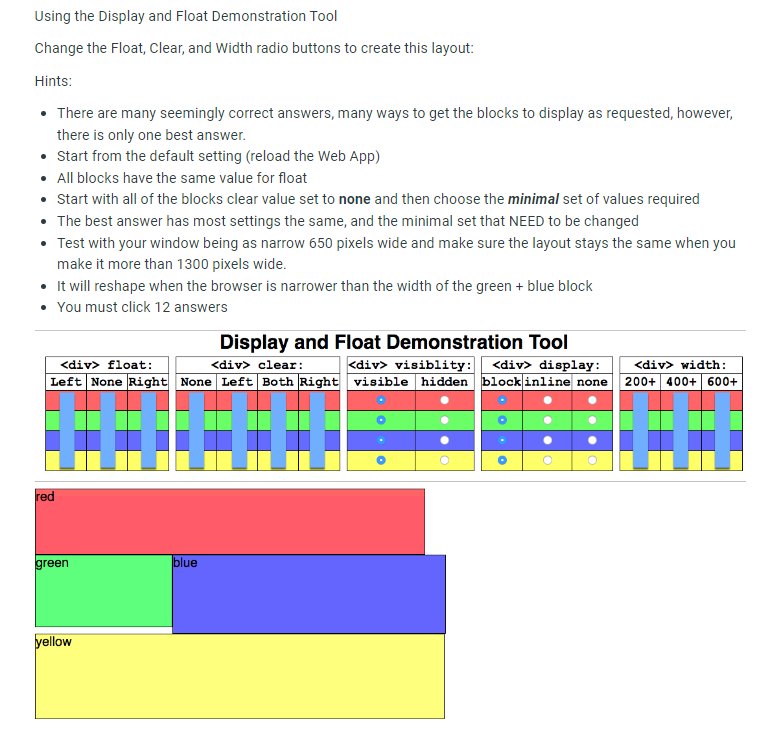
Question: Change the Float, Clear, and Width radio buttons to create this layout: Hints: There are many seemingly correct answers, many ways to get the blocks
Change the Float, Clear, and Width radio buttons to create this layout:
Hints:
There are many seemingly correct answers, many ways to get the blocks to display as requested, however,
there is only one best answer.
Start from the default setting reload the Web App
All blocks have the same value for float
Start with all of the blocks clear value set to none and then choose the minimal set of values required
The best answer has most settings the same, and the minimal set that NEED to be changed
Test with your window being as narrow pixels wide and make sure the layout stays the same when you
make it more than pixels wide.
It will reshape when the browser is narrower than the width of the green blue block
You must click answers
Display and Float Demonstration Tool
table
Step by Step Solution
There are 3 Steps involved in it
1 Expert Approved Answer
Step: 1 Unlock

Question Has Been Solved by an Expert!
Get step-by-step solutions from verified subject matter experts
Step: 2 Unlock
Step: 3 Unlock
 Study Help