



Question: Chapter 2 Review Required Data File: healthy.png Create a new HTML file in Notepad++ with the title Lab 2 . Save the file as Review
Chapter 2 Review
Required Data File: healthy.png
Create a new HTML file in Notepad++ with the title Lab 2 . Save the file as Review 2.
In the body section, add an
heading, Healthy Living Plan. Format the heading to use the heading 1 style centered-aligned on the Web page.
Add the centered paragraph of text shown in Figure 2 below.
Add a horizontal rule with a height of 10 pixel, a width of 80%, and a background color of #2fb66a
Add a centered heading, as shown, using the heading 2 style.
Add the healthy.png image. Find the height and width properties for that image and include them together with alternate text.
Add another
heading and horizontal rule.
Save changes to the Review 2 file
should look like this
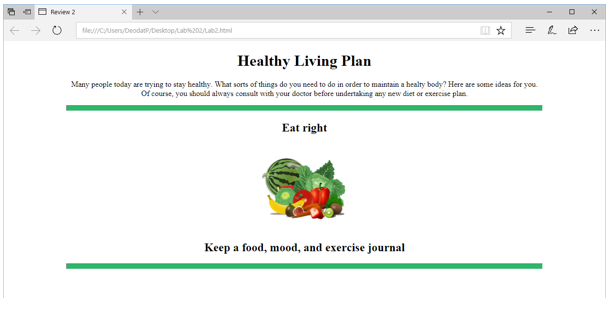
Review 2 O |tle://cusers.codatnesktoptat%202/Lab2html Healthy Living Plan Many people today are trying to stay healthy. What sorts of things do you need to do in order to maintain a healty body? Here are some ideas for you Of course, you should always consu with your dector before undertalong any sew diet or exercise plan Eat right Keep a food, mood, and exercise journal
Step by Step Solution
There are 3 Steps involved in it

Get step-by-step solutions from verified subject matter experts