







Question: @charset utf-8; /* New Perspectives on HTML5 and CSS3, 8th Edition Tutorial 3 Coding Challenge 4 Author: Huseyin Yildiz Date: 3/4/2021 Filename: debug3-4.css */ /*
@charset "utf-8";
/*
New Perspectives on HTML5 and CSS3, 8th Edition
Tutorial 3
Coding Challenge 4
Author: Huseyin Yildiz
Date: 3/4/2021
Filename: debug3-4.css
*/
/* Page Body Styles */
body {
width: 90%;
min-width: 600px;
max-width: 1024px;
margin: 10px auto;
display: grid;
grid-template-columns: 200px auto 200px;
grid-template-areas:
'headers headers headers'
'links links links'
'navs main sides'
'navs coupons sides'
'footers footers footers';
grid-gap: 10px 25px;
}
/* Grid Areas */
header {
grid-area: headers;
}
nav.horizontal {grid-area: links;}
nav.vertical {grid-area: navs;}
article {grid-area: main;}
section {grid-area: coupons;}
aside {grid-area: sides;}
footer {grid-area: footers;}
/* Image Styles */
header img {
display: block;
width: 100%;
}
/* Horizontal Navigation List Styles */
nav.horizontal ul {
width: 100%;
display: grid;
grid-template-columns: repeat(5,1fr);
}
nav.horizontal ul li {
display: block;
text-align: center;
}
/* Coupon Section Styles */
section {
display: grid;
grid-template-columns: repeat(3, 1fr);
grid-gap: 20px;
}
section div {
outline: 4px dashed gray;
position: relative;
}
section div p:last-of-type {
position: absolute;
bottom: 1px;
right: 5px;
}
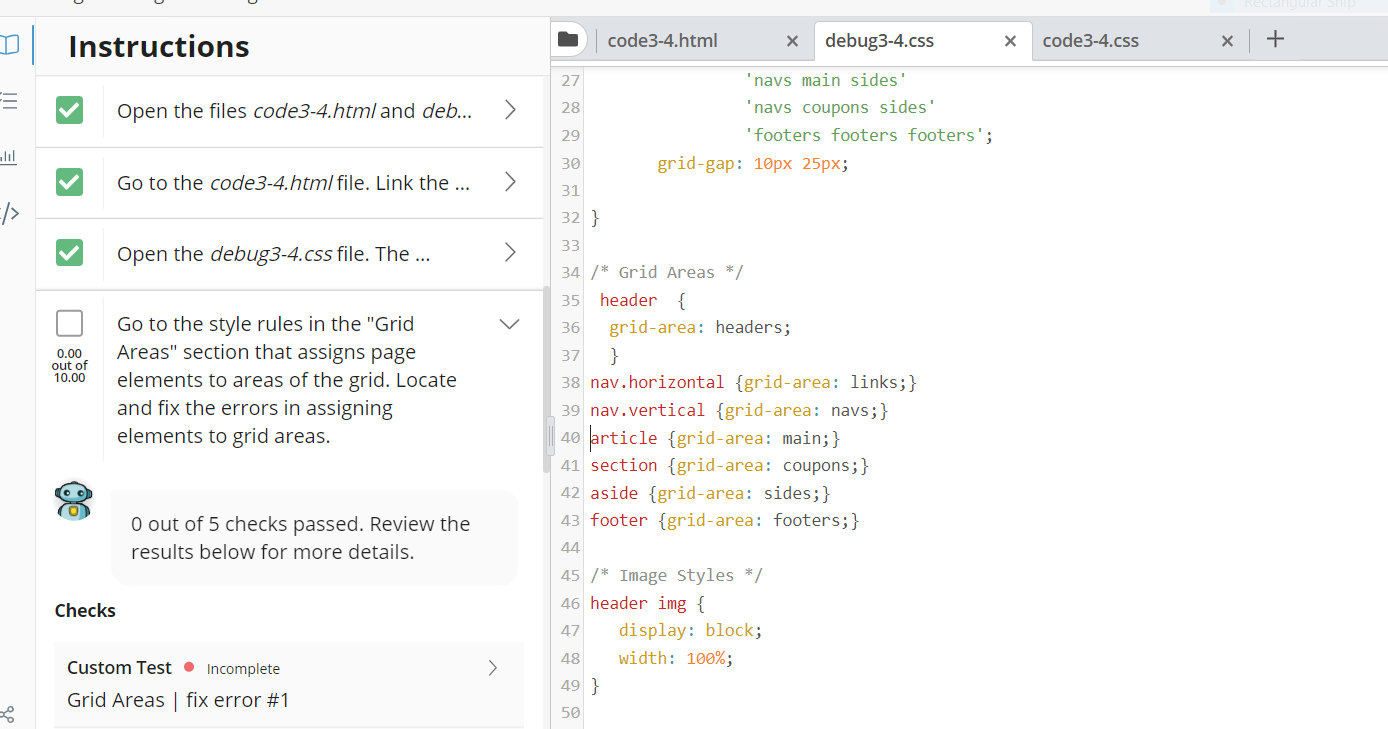
Hello! Could you fix the errors on "Grid Areas"? According to program,there are 5 errors in "Grid Areas". Thank you!
Instructions code3-4.html debug3-4.css code3-4.css + Open the files code3-4.html and deb... > lil Go to the code3-4.html file. Link the ... /> Open the debug3-4.css file. The ... > 0.00 out of 10.00 Go to the style rules in the "Grid Areas" section that assigns page elements to areas of the grid. Locate and fix the errors in assigning elements to grid areas. 27 'navs main sides' 28 'navs coupons sides' 29 'footers footers footers'; 30 grid-gap: 10px 25px; 31 32 } 33 34 /* Grid Areas */ 35 header { 36 grid-area: headers; 37 } 38 nav.horizontal {grid-area: links;} 39 nav.vertical {grid-area: navs;} 40 article {grid-area: main;} 41 section {grid-area: coupons;} 42 aside {grid-area: sides;} 43 footer {grid-area: footers;} 44 45 /* Image Styles */ 46 header img { 47 display: block; 48 width: 100%; 49 } 50 0 out of 5 checks passed. Review the results below for more details. Checks Custom Test Incomplete > Grid Areas fix error #1 Instructions code3-4.html debug3-4.css code3-4.css + Open the files code3-4.html and deb... > lil Go to the code3-4.html file. Link the ... /> Open the debug3-4.css file. The ... > 0.00 out of 10.00 Go to the style rules in the "Grid Areas" section that assigns page elements to areas of the grid. Locate and fix the errors in assigning elements to grid areas. 27 'navs main sides' 28 'navs coupons sides' 29 'footers footers footers'; 30 grid-gap: 10px 25px; 31 32 } 33 34 /* Grid Areas */ 35 header { 36 grid-area: headers; 37 } 38 nav.horizontal {grid-area: links;} 39 nav.vertical {grid-area: navs;} 40 article {grid-area: main;} 41 section {grid-area: coupons;} 42 aside {grid-area: sides;} 43 footer {grid-area: footers;} 44 45 /* Image Styles */ 46 header img { 47 display: block; 48 width: 100%; 49 } 50 0 out of 5 checks passed. Review the results below for more details. Checks Custom Test Incomplete > Grid Areas fix error #1
Step by Step Solution
There are 3 Steps involved in it

Get step-by-step solutions from verified subject matter experts
 Study Help