







Question: CHECKING Amount Type Trans Date Description Post Date -116.00 Sale 01/15/2022 01/16/2022 SOFIA RAPHAEL ASSOCIATES -84.00 Sale 01/13/2022 01/14/2022 BICHOTTE SUPPLIES 2000.00 Deposit 01/12/2022 01/13/2022
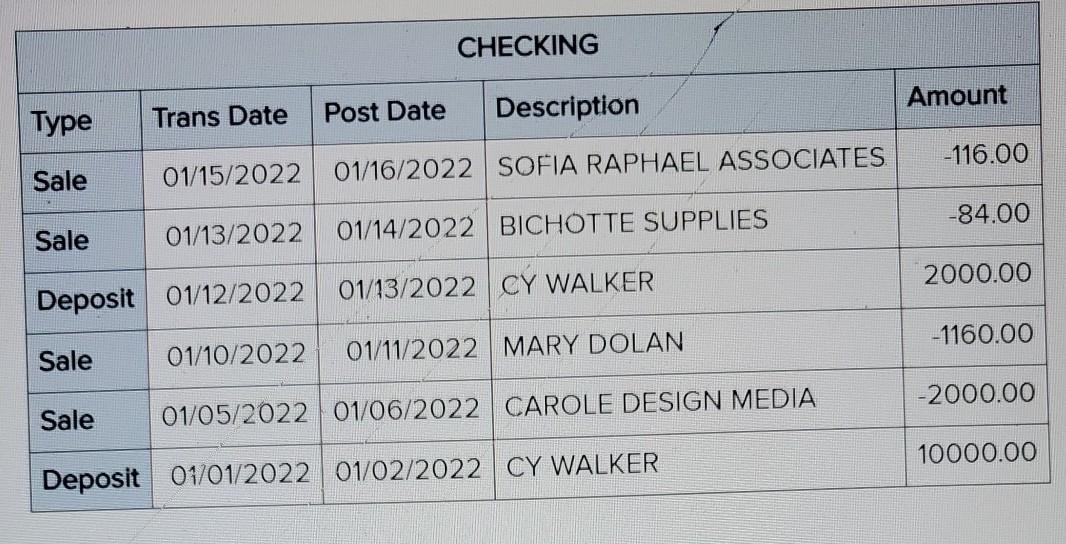
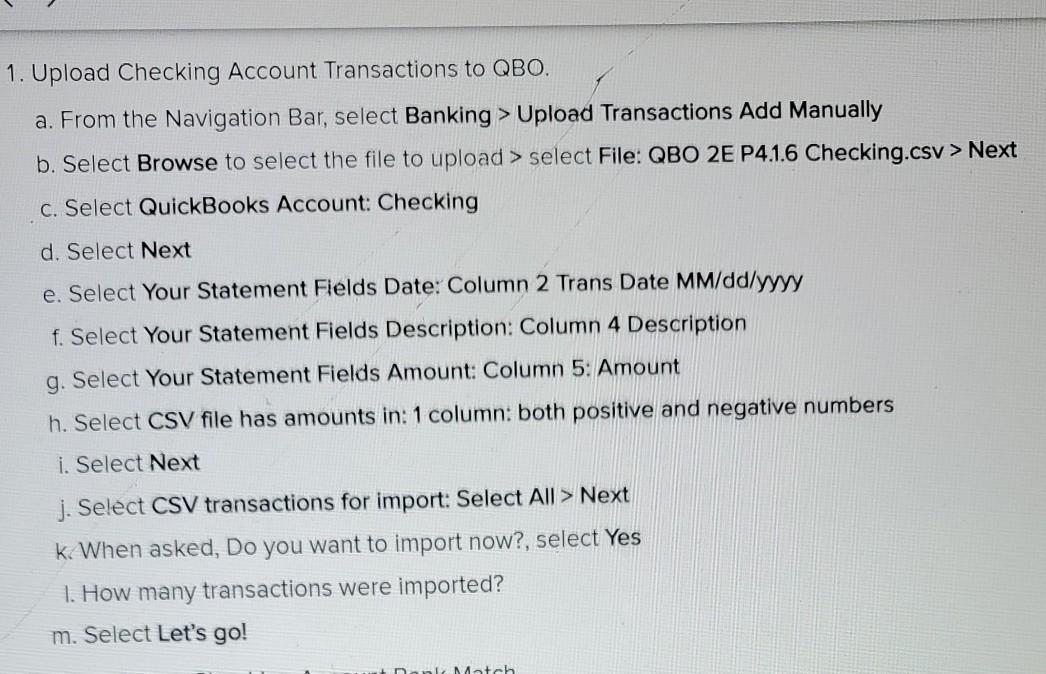
CHECKING Amount Type Trans Date Description Post Date -116.00 Sale 01/15/2022 01/16/2022 SOFIA RAPHAEL ASSOCIATES -84.00 Sale 01/13/2022 01/14/2022 BICHOTTE SUPPLIES 2000.00 Deposit 01/12/2022 01/13/2022 CY WALKER -1160.00 Sale 01/10/2022 01/11/2022 MARY DOLAN -2000.00 Sale 01/05/2022 01/06/2022 CAROLE DESIGN MEDIA 10000.00 Deposit 01/01/2022 01/02/2022 CY WALKER 1. Upload Checking Account Transactions to QBO. a. From the Navigation Bar, select Banking > Upload Transactions Add Manually b. Select Browse to select the file to upload > select File: QBO 2E P4.1.6 Checking.csv > Next C. Select QuickBooks Account Checking d. Select Next e. Select Your Statement Fields Date: Column 2 Trans Date MM/dd/yyyy f. Select Your Statement Fields Description: Column 4 Description g. Select Your Statement Fields Amount: Column 5: Amount h. Select CSV file has amounts in: 1 column: both positive and negative numbers i. Select Next j. Select CSV transactions for import: Select All > Next k. When asked, Do you want to import now?, select Yes 1. How many transactions were imported? m. Select Let's go! Match CHECKING Amount Type Trans Date Description Post Date -116.00 Sale 01/15/2022 01/16/2022 SOFIA RAPHAEL ASSOCIATES -84.00 Sale 01/13/2022 01/14/2022 BICHOTTE SUPPLIES 2000.00 Deposit 01/12/2022 01/13/2022 CY WALKER -1160.00 Sale 01/10/2022 01/11/2022 MARY DOLAN -2000.00 Sale 01/05/2022 01/06/2022 CAROLE DESIGN MEDIA 10000.00 Deposit 01/01/2022 01/02/2022 CY WALKER 1. Upload Checking Account Transactions to QBO. a. From the Navigation Bar, select Banking > Upload Transactions Add Manually b. Select Browse to select the file to upload > select File: QBO 2E P4.1.6 Checking.csv > Next C. Select QuickBooks Account Checking d. Select Next e. Select Your Statement Fields Date: Column 2 Trans Date MM/dd/yyyy f. Select Your Statement Fields Description: Column 4 Description g. Select Your Statement Fields Amount: Column 5: Amount h. Select CSV file has amounts in: 1 column: both positive and negative numbers i. Select Next j. Select CSV transactions for import: Select All > Next k. When asked, Do you want to import now?, select Yes 1. How many transactions were imported? m. Select Let's go! Match
Step by Step Solution
There are 3 Steps involved in it

Get step-by-step solutions from verified subject matter experts
 Study Help