







Question: VISA CREDIT CARD Type Trans Date Post Date Description Amount Sale 01/14/2022 01/14/2022 LUMINESSE LINK -144.00 Sale 01/13/2022 01/13/2022 LUMINESSE LINK -200.00 Deposit 01/07/2022 01/08/2022
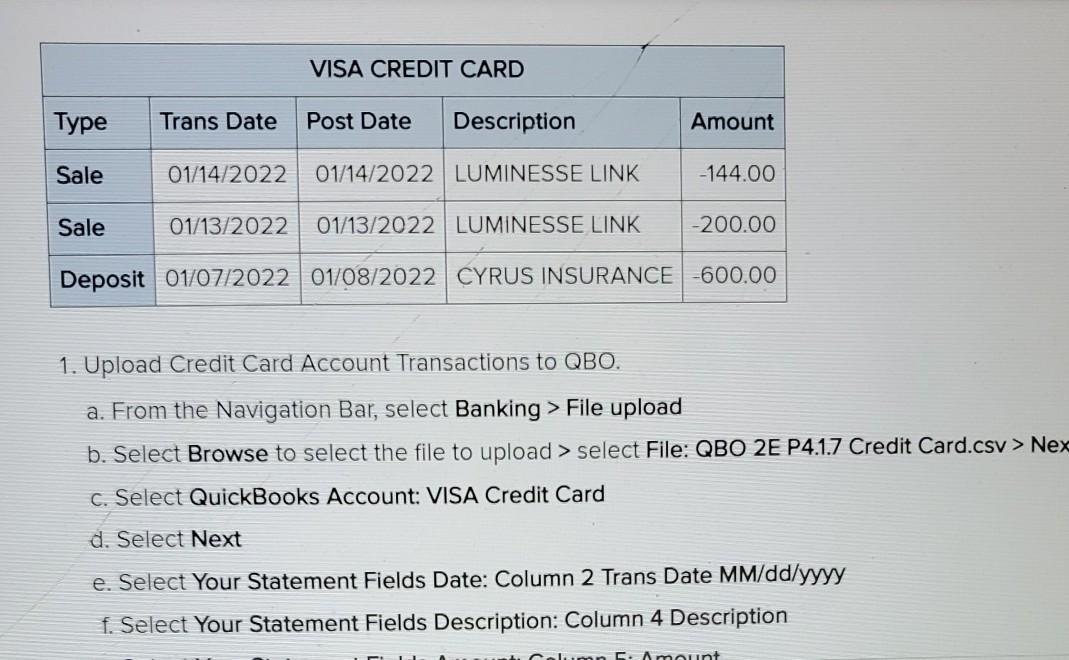
VISA CREDIT CARD Type Trans Date Post Date Description Amount Sale 01/14/2022 01/14/2022 LUMINESSE LINK -144.00 Sale 01/13/2022 01/13/2022 LUMINESSE LINK -200.00 Deposit 01/07/2022 01/08/2022 CYRUS INSURANCE -600.00 1. Upload Credit Card Account Transactions to QBO. a. From the Navigation Bar, select Banking > File upload b. Select Browse to select the file to upload > select File: QBO 2E P4.1.7 Credit Card.csv > Nex c. Select QuickBooks Account: VISA Credit Card d. Select Next e. Select Your Statement Fields Date: Column 2 Trans Date MM/dd/yyyy f. Select Your Statement Fields Description: Column 4 Description Amunt VISA CREDIT CARD Type Trans Date Post Date Description Amount Sale 01/14/2022 01/14/2022 LUMINESSE LINK -144.00 Sale 01/13/2022 01/13/2022 LUMINESSE LINK -200.00 Deposit 01/07/2022 01/08/2022 CYRUS INSURANCE -600.00 1. Upload Credit Card Account Transactions to QBO. a. From the Navigation Bar, select Banking > File upload b. Select Browse to select the file to upload > select File: QBO 2E P4.1.7 Credit Card.csv > Nex c. Select QuickBooks Account: VISA Credit Card d. Select Next e. Select Your Statement Fields Date: Column 2 Trans Date MM/dd/yyyy f. Select Your Statement Fields Description: Column 4 Description Amunt
Step by Step Solution
There are 3 Steps involved in it

Get step-by-step solutions from verified subject matter experts
 Study Help