







Question: cisco packet tracer Question 2 ( Design a network in packet tracer 2 routers 2 pcs and 1 tac server )) Implement centralized authentication using
cisco packet tracer
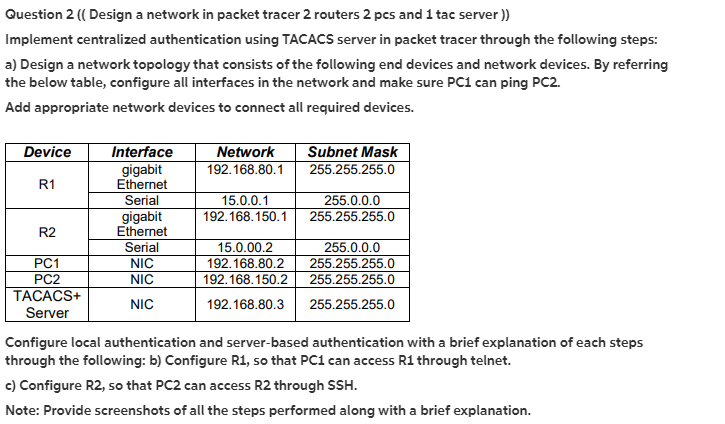
Question 2 ( Design a network in packet tracer 2 routers 2 pcs and 1 tac server )) Implement centralized authentication using TACACS server in packet tracer through the following steps: a) Design a network topology that consists of the following end devices and network devices. By referring the below table, configure all interfaces in the network and make sure PC1 can ping PC2. Add appropriate network devices to connect all required devices. Device Interface Network Subnet Mask gigabit 192.168.80.1 255.255.255.0 R1 Ethernet Serial 15.0.0.1 255.0.0.0 gigabit 192.168.150.1 255.255.255.0 R2 Ethernet Serial 15.0.00.2 255.0.0.0 PC1 NIC 192.168.80.2 255.255.255.0 PC2 NIC 192.168.150.2 255.255.255.0 TACACS+ NIC 192.168.80.3 255.255.255.0 Server Configure local authentication and server-based authentication with a brief explanation of each steps through the following: b) Configure R1, so that PC1 can access R1 through telnet. c) Configure R2, so that PC2 can access R2 through SSH. Note: Provide screenshots of all the steps performed along with a brief explanation. Question 2 ( Design a network in packet tracer 2 routers 2 pcs and 1 tac server )) Implement centralized authentication using TACACS server in packet tracer through the following steps: a) Design a network topology that consists of the following end devices and network devices. By referring the below table, configure all interfaces in the network and make sure PC1 can ping PC2. Add appropriate network devices to connect all required devices. Device Interface Network Subnet Mask gigabit 192.168.80.1 255.255.255.0 R1 Ethernet Serial 15.0.0.1 255.0.0.0 gigabit 192.168.150.1 255.255.255.0 R2 Ethernet Serial 15.0.00.2 255.0.0.0 PC1 NIC 192.168.80.2 255.255.255.0 PC2 NIC 192.168.150.2 255.255.255.0 TACACS+ NIC 192.168.80.3 255.255.255.0 Server Configure local authentication and server-based authentication with a brief explanation of each steps through the following: b) Configure R1, so that PC1 can access R1 through telnet. c) Configure R2, so that PC2 can access R2 through SSH. Note: Provide screenshots of all the steps performed along with a brief explanation
Step by Step Solution
There are 3 Steps involved in it

Get step-by-step solutions from verified subject matter experts
 Study Help