







Question: Draw two small networks using Cisco Packet tracer. Each network has a router (model 2911) and a switch (model 2960) , the first network will
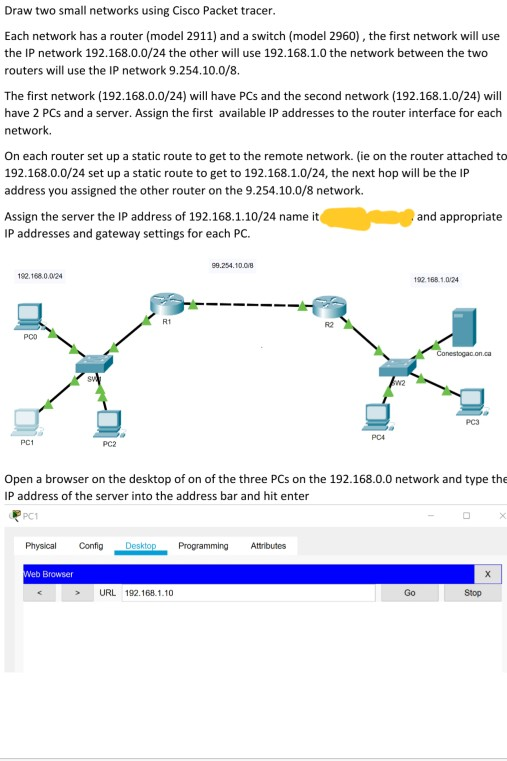
Draw two small networks using Cisco Packet tracer. Each network has a router (model 2911) and a switch (model 2960) , the first network will use the IP network 192.168.0.0/24 the other will use 192.168.1.0 the network between the two routers will use the IP network 9.254.10.0/8. The first network (192.168.0.0/24) will have PCs and the second network (192.168.1.0/24) will have 2 PCs and a server. Assign the first available IP addresses to the router interface for each network. On each router set up a static route to get to the remote network. (ie on the router attached to 192.168.0.0/24 set up a static route to get to 192.168.1.0/24, the next hop will be the IP address you assigned the other router on the 9.254.10.0/8 network. Assign the server the IP address of 192.168.1.10/24 name it "welcome' and appropriate IP addresses and gateway settings for each PC. Open a browser on the desktop of on of the three PCs on the 192.168.0.0 network and type the IP address of the server into the address bar and hit enter
Take a screenshot of the resulting web page and paste it. Submit the .pkt file as well as the word document.
yes. use cisco packet tracer. the question is direct and it doesnt have to be complicated
i need full packet tracer package
Draw two small networks using Cisco Packet tracer. Each network has a router (model 2911) and a switch (model 2960), the first network will use the IP network 192.168.0.0/24 the other will use 192.168.1.0 the network between the two routers will use the IP network 9.254.10.0/8. The first network (192.168.0.0/24) will have PCs and the second network (192.168.1.0/24) will have 2 PCs and a server. Assign the first available IP addresses to the router interface for each network On each router set up a static route to get to the remote network. (ie on the router attached to 192.168.0.0/24 set up a static route to get to 192.168.1.0/24, the next hop will be the IP address you assigned the other router on the 9.254.10.0/8 network. and appropriate Assign the server the IP address of 192.168.1.10/24 name it IP addresses and gateway settings for each PC. 99.254.10.018 192.168.0.0/24 192 168 1024 - - - - - - - - - R2 POO Conestogacon.ca Open a browser on the desktop of on of the three PCs on the 192.168.0.0 network and type the IP address of the server into the address bar and hit enter Physical conte Desktop Programming Attributes Web Browser > URL 192.168.1.10 GO Stop
Step by Step Solution
There are 3 Steps involved in it

Get step-by-step solutions from verified subject matter experts
 Study Help