







Question: Class Name: Messenger Using Java Class variables: None Class Methods Method #1: getAns() Parameters: String txt Tasks: a. Display a message on the screen using
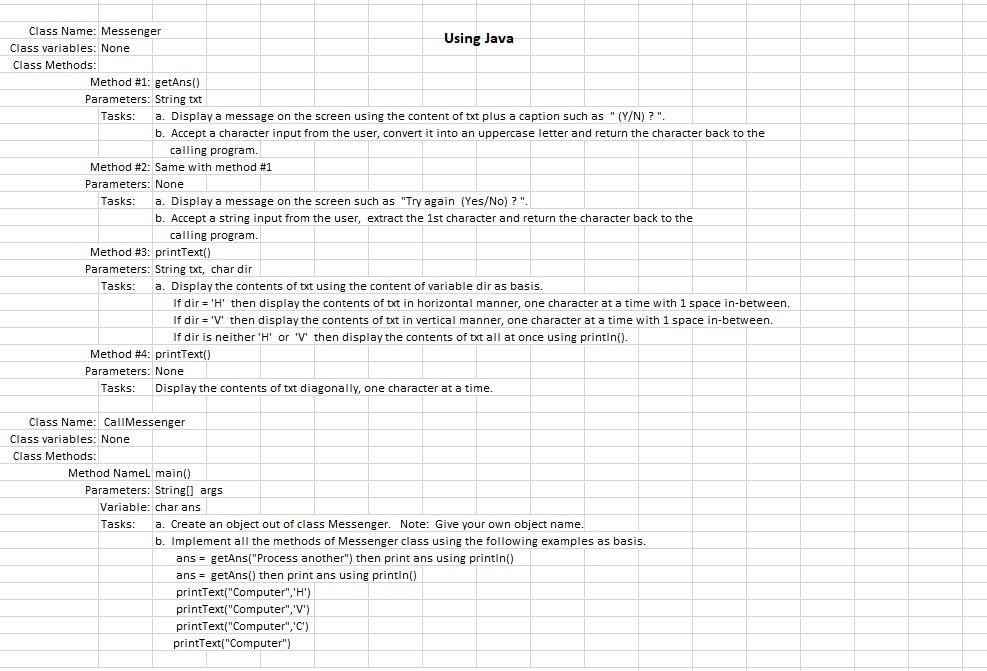
Class Name: Messenger Using Java Class variables: None Class Methods Method #1: getAns() Parameters: String txt Tasks: a. Display a message on the screen using the content of txt plus a caption such as " (Y/N)?". b. Accept a character input from the user, convert it into an uppercase letter and return the character back to the calling program. Method #2: Same with method #1 Parameters: None Tasks: a. Display a message on the screen such as "Try again (Yes/No)?". b. Accept a string input from the user, extract the 1st character and return the character back to the calling program. Method #3: printText() Parameters: String txt, char dir Tasks: a. Display the contents of txt using the content of variable dir as basis. If dir = 'H' then display the contents of txt in horizontal manner, one character at a time with 1 space in-between. If dir = 'V' then display the contents of txt in vertical manner, one character at a time with 1 space in-between. If dir is neither 'H' or 'V' then display the contents of txt all at once using println(). Method #4: printText() Parameters: None Tasks: Display the contents of txt diagonally, one character at a time. Class Name: Call Messenger Class variables: None Class Methods: Method Namel main() Parameters: String[] args Variable: char ans Tasks: Create an object out of class Messenger. Note: Give your own object name. b. Implement all the methods of Messenger class using the following examples as basis. ans = getAns("Process another") then print ans using printin() ans = getAns() then print ans using printin() printText("Computer", 'H') printText("Computer", 'V') printText("Computer", 'C') printText("Computer")
Step by Step Solution
There are 3 Steps involved in it

Get step-by-step solutions from verified subject matter experts
 Study Help