







Question: - Click the reset button (the round, orange button on the upper right-hand corner) of the same simulation to clear all the current settings. -
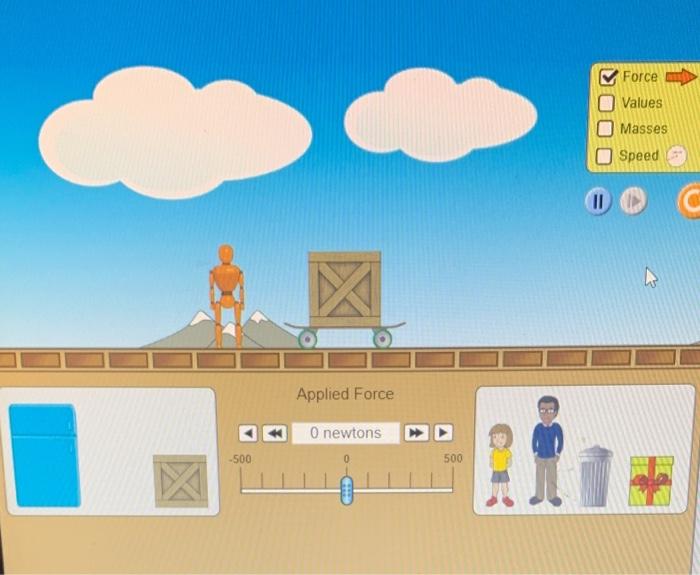
- Click the "reset" button (the round, orange button on the upper right-hand corner) of the same simulation to clear all the current settings. - Tick all the items (force, values, masses, speed) inside the yellow box. Remove the crate from the top of the skateboard and place it inside the box (lower left). - Position the 40-kg child on top of the skateboard. You have to observe its acceleration within a 5-second time interval by referring to Step 4. Use a digital stopwatch as a timer (you may use your phone stopwatch). - Set the force at 50N. The skateboard and its load will then start moving. Stop the motion of the body by pressing the "pause" (1) button AFTER FIVE (5) SECONDS (starting from the time you set the force as 50N ). Check the speed (refer to the speed shown in the circle, upper left) reached by the body within the 5 -second time interval. Record this value in Table I as the final velocity of that particular item. - Do the same for all the other items listed in the table below. Click "reset" every time you start with a new item, and always tick all the items inside the yellow box. Remove the crate (the default setting) on top of the skateboard before placing a new item, unless the crate itself is the item you need to select. The force must be the same (50N) for all these items. - Compute for the acceleration of all the items considered and record the data in the last column. (time equals 5 seconds for all the items) - Click the "reset" button (the round, orange button on the upper right-hand corner) of the same simulation to clear all the current settings. - Tick all the items (force, values, masses, speed) inside the yellow box. Remove the crate from the top of the skateboard and place it inside the box (lower left). - Position the 40-kg child on top of the skateboard. You have to observe its acceleration within a 5-second time interval by referring to Step 4. Use a digital stopwatch as a timer (you may use your phone stopwatch). - Set the force at 50N. The skateboard and its load will then start moving. Stop the motion of the body by pressing the "pause" (1) button AFTER FIVE (5) SECONDS (starting from the time you set the force as 50N ). Check the speed (refer to the speed shown in the circle, upper left) reached by the body within the 5 -second time interval. Record this value in Table I as the final velocity of that particular item. - Do the same for all the other items listed in the table below. Click "reset" every time you start with a new item, and always tick all the items inside the yellow box. Remove the crate (the default setting) on top of the skateboard before placing a new item, unless the crate itself is the item you need to select. The force must be the same (50N) for all these items. - Compute for the acceleration of all the items considered and record the data in the last column. (time equals 5 seconds for all the items)
Step by Step Solution
There are 3 Steps involved in it

Get step-by-step solutions from verified subject matter experts
 Study Help