





Question: Client Class - Class Composition (Aggregation) Create the new project Assign05-ClientComposition. Click the Project tab and select Add Class... Click C++ Class and then the
 Client Class - Class Composition (Aggregation) Create the new project Assign05-ClientComposition.Click the Project tab and select Add Class... Click C++ Class and

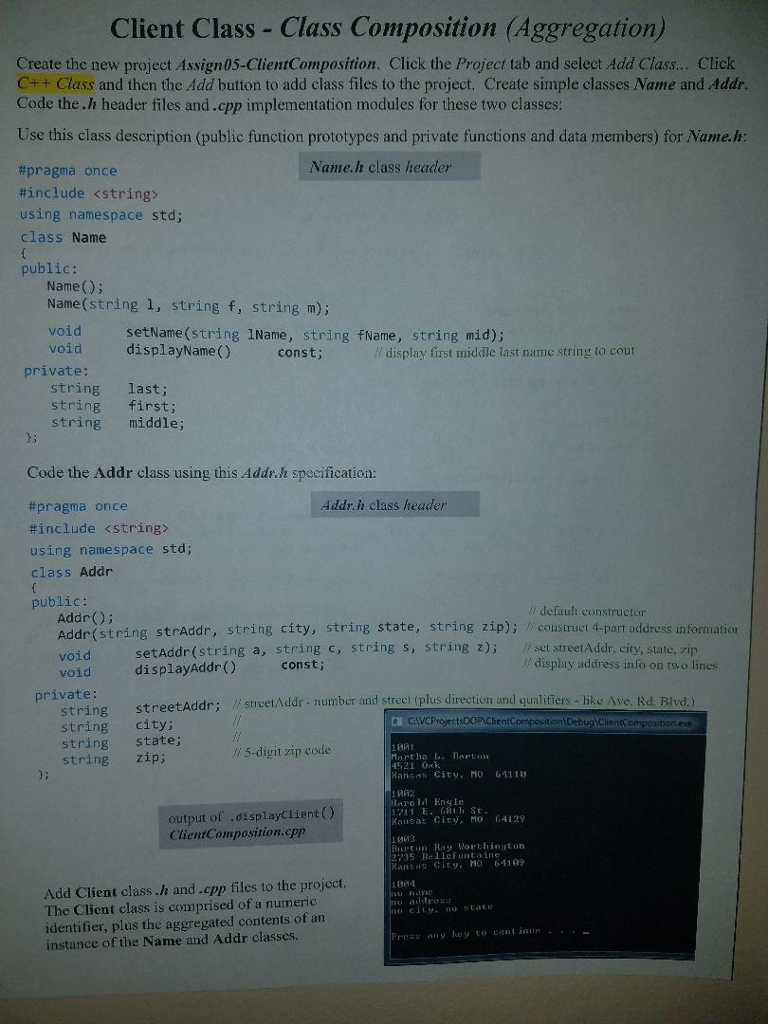
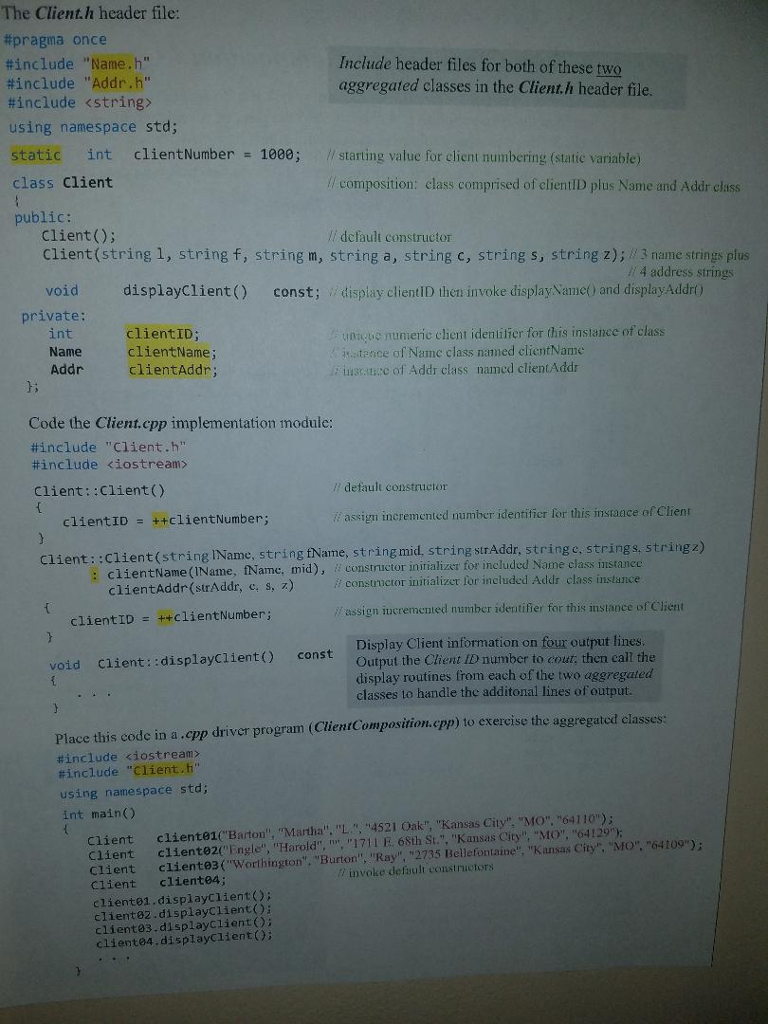
Client Class - Class Composition (Aggregation) Create the new project Assign05-ClientComposition. Click the Project tab and select Add Class... Click C++ Class and then the Add button to add class files to the project. Create simple classes Name and Addr. Code the.h header files and.cpp implementation modules for these two classes: Use this class description (public function prototypes and private functions and data members) for Name.h: #pragma once Name.h class header #include using namespace std; class Name public: Name(0); Name(string 1, string f, string m); void setName(string lName, string FName, string mid); void displayName() const; / display first middle last name string to cout private: string last; string first; string middle; Code the Addr class using this Addr. specification: Addr.h class header #pragma Price #include using namespace std; class Addr public: Addr(); // default constructor Adde/string strAddr, string city, string state, string Zip) Construel 4-part address information void setAddr(string a, string C, string S, String 2); // set streetAddr, city, state.zip displayAddr() void // display address info on two lines const; private: string string streetAddr; // streetAddr - number and street (plus direction and qualitiers - like Ave. Rd, Blvd. streetAddr; string city: CO CAVCProjects00P\ClientComposition\DebugClientcompositionere string state; // 5-digit zip code string zip; Martha L. Bart. 45210k Kansas City, MO 64118 LAIo l Engle Kansas City, MO 64129 output of .displayClient() ClientComposition.cpp Buat Hay Worthington 295 Hellefontaine t no altro Add Client class.h and.cpp files to the project. The Client class is comprised of a numeric identifier, plus the aggregated contents of an instance of the Name and Addr classes. PASSO AI uy to continue

Step by Step Solution

There are 3 Steps involved in it

1 Expert Approved Answer
Step: 1 Unlock blur-text-image
Question Has Been Solved by an Expert!

Get step-by-step solutions from verified subject matter experts

Step: 2 Unlock
Step: 3 Unlock

Students Have Also Explored These Related Databases Questions!