







Question: Code is in C, thanks CS 100 Lab Six -Spring 2018 Create a directory called lab6 on your machine using mkdir lab 6 and move
Code is in C, thanks
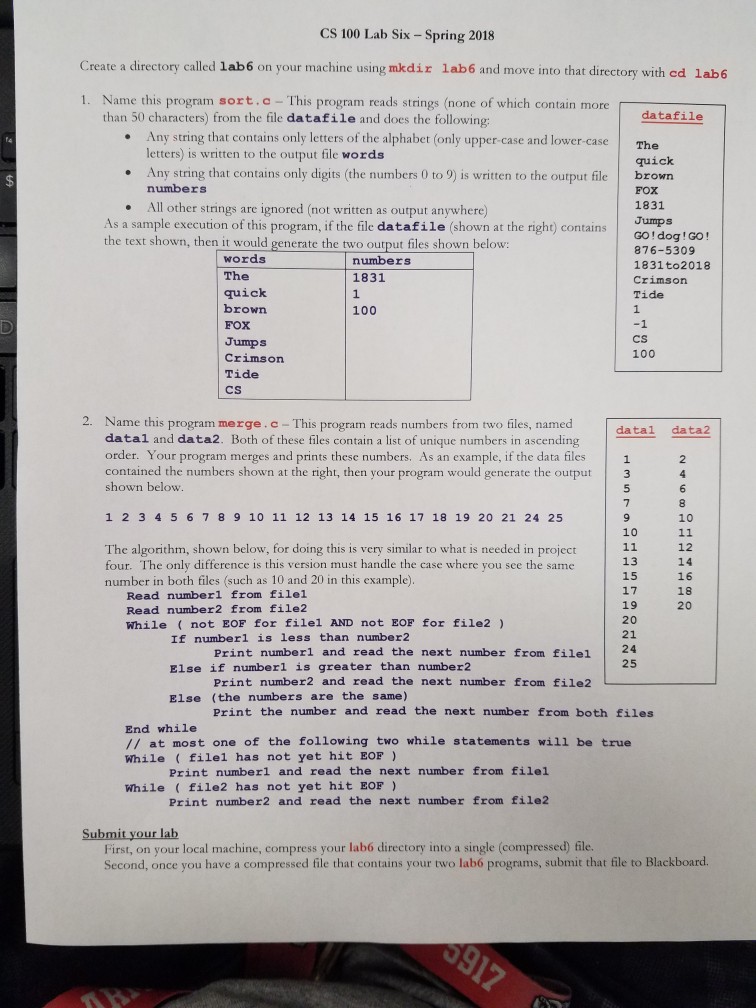
CS 100 Lab Six -Spring 2018 Create a directory called lab6 on your machine using mkdir lab 6 and move into that directory with cd lab6 1. Name this program sort.c - This program reads strings (none of which contain more than 50 characters) from the file datafile and does the following: datafile Any string that contains only letters of the alphabet (only upper case and lower-case The letters) is written to the output file words .Any string that contains only digits (the numbers 0 to 9) is written to the output file quick brown numbers All other strings are ignored (not written as output anywhere) 1831 As a sample execution of this program, if the file datafile (shown at the right) contains the text shown, then it would generate the two output files shown below: GO! dog! GO! 876-5309 1831 to2018 Crimson Tide words numbers 1831 quick brown Crimson 2. Name this program merge.c- This program reads numbers from two files, named datal and data2. Both of these files contain a list of unique numbers in ascending order. Your program merges and prints these numbers. As an example, if the data files contained the numbers shown at the right, then your program would generate the output3 shown below datal data2 1 2 3 4 5 6 7 8 9 10 11 12 13 14 15 16 17 18 19 20 21 24 25 The algorithm, shown below, for doing this is very similar to what is needed in p four. The only difference is this version must handle the case where you see the same number in both files (such as 10 and 20 in this example) Read numberl from filel Read number2 from file2 While not EOF for filel AND not EOF for file2 If numberl is less than number2 Else if numberl is greater than number2 Else (the numbers are the same) Print numberl and read the next number from filel Print number2 and read the next number from file2 Print the number and read the next number from both files End while // at most one of the following two while statements will be true While filel has not yet hit EOF) Print numberl and read the next number from filel e2 has not yet hit EOF) Print number2 and read the next number from file2 First, on your local machine, compress your lab6 directory into a single (compressed) file. Second, once you have a compressed file that contains your two lab6 programs, submit that file to Blackboard
Step by Step Solution
There are 3 Steps involved in it

Get step-by-step solutions from verified subject matter experts
 Study Help