







Question: COLUMN NAME DATA TYPE NULLABLE DATA DEFAULT COLUMN ID Hiredate date no (null) 9 professorid NUMBER(8,0) no (null) 1 phone VARCHAR2(10 BYTE) yes (null) 8
| COLUMN NAME | DATA TYPE | NULLABLE | DATA DEFAULT | COLUMN ID |
| Hiredate | date | no | (null) | 9 |
| professorid | NUMBER(8,0) | no | (null) | 1 |
| phone | VARCHAR2(10 BYTE) | yes | (null) | 8 |
| state | VARCHAR2(2 BYTE) | no | (null) | 6 |
| firstname | VARCHAR2(25 BYTE) | no | (null) | 2 |
| lastname | VARCHAR2(25 BYTE) | no | (null) | 3 |
| city | VARCHAR2(25 BYTE) | no | (null) | 5 |
| streetaddress | VARCHAR2(40 BYTE) | no | (null) | 4 |
| zip | VARCHAR2(9 BYTE) | yes | (null) | 7 |
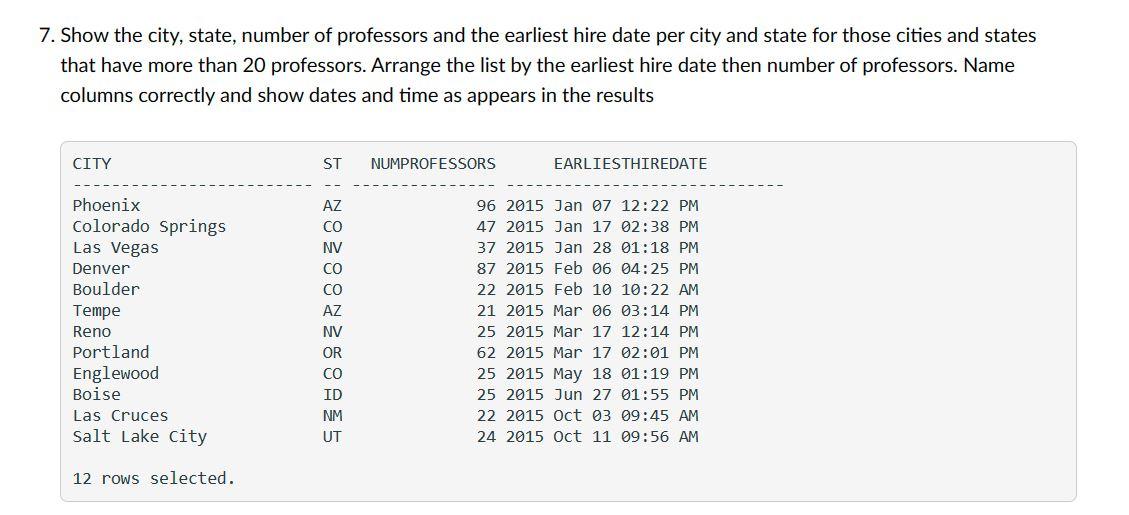
7. Show the city, state, number of professors and the earliest hire date per city and state for those cities and states that have more than 20 professors. Arrange the list by the earliest hire date then number of professors. Name columns correctly and show dates and time as appears in the results
Step by Step Solution
There are 3 Steps involved in it
1 Expert Approved Answer
Step: 1 Unlock

Question Has Been Solved by an Expert!
Get step-by-step solutions from verified subject matter experts
Step: 2 Unlock
Step: 3 Unlock
 Study Help