







Question: Column1: Email (VARCHAR 20) Column2: Password (not encrypted) (VARCHAR 20) Column3: UserRole (Guest or Admin) (VARCHAR 10) Provide 3 admin login credentials and 5 guest
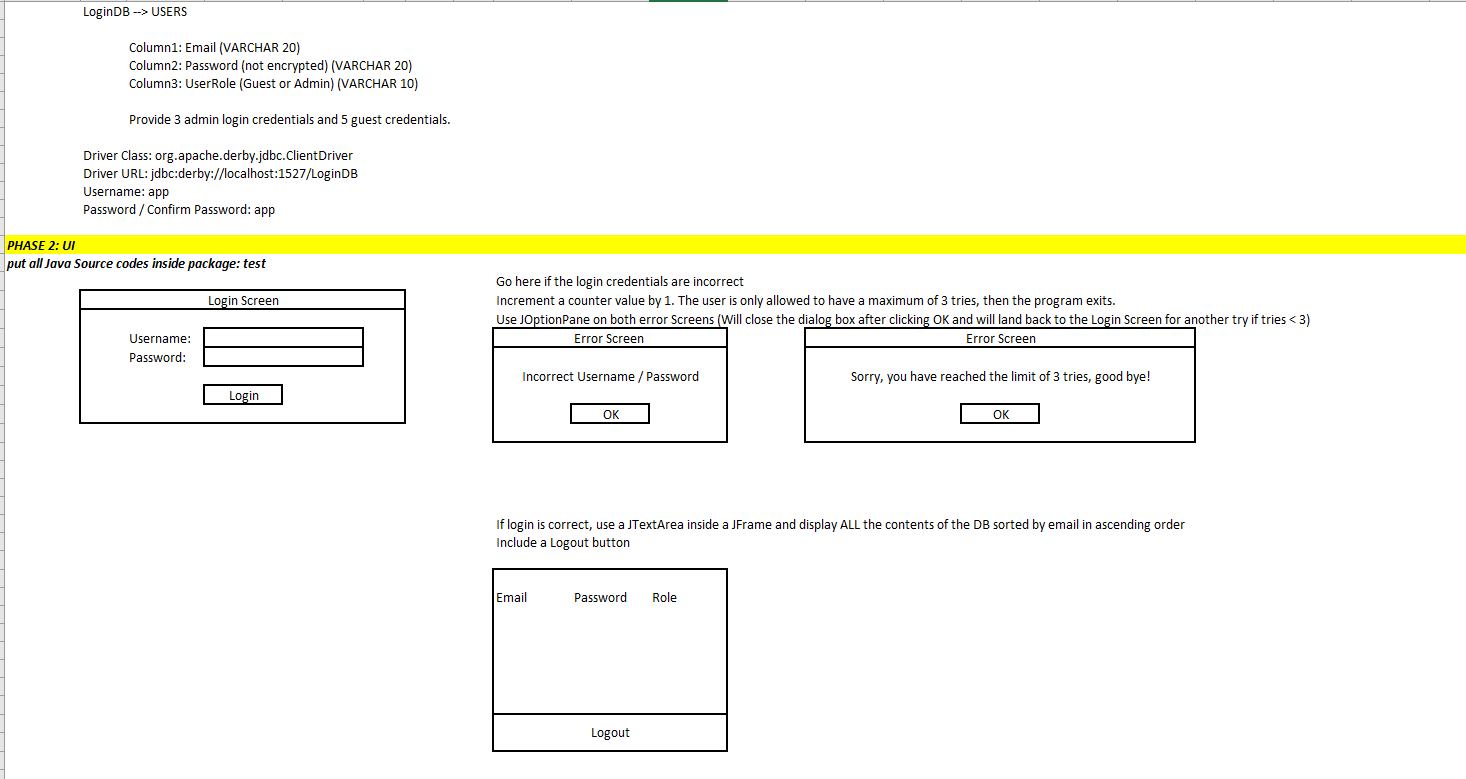
Column1: Email (VARCHAR 20) Column2: Password (not encrypted) (VARCHAR 20) Column3: UserRole (Guest or Admin) (VARCHAR 10) Provide 3 admin login credentials and 5 guest credentials. Driver Class: org.apache.derby.jdbc.ClientDriver Driver URL: jdbc:derby://localhost:1527/LoginDB Username: app Password / Confirm Password: app PHASE 2: UI put all Java Source codes inside package: test \begin{tabular}{|l|} \hline \multicolumn{1}{|c|}{ Login Screen } \\ \hline Username: \\ Password: \\ \hline \end{tabular} Go here if the login credentials are incorrect Increment a counter value by 1 . The user is only allowed to have a maximum of 3 tries, then the program exits. Use JOptionPane on both error Screens (Will close the dialog box after clicking OK and will land back to the Login Screen for anot \begin{tabular}{|c|} \hline Error Screen \\ \hline Incorrect Username / Password \\ \hline \end{tabular} \begin{tabular}{|c|} \hline Error Screen \\ \hline Sorry, you have reached the limit of 3 tries, good bye! \\ \hline \end{tabular} If login is correct, use a JTextArea inside a JFrame and display ALL the contents of the DB sorted by email in ascending order Include a Logout button
Step by Step Solution
There are 3 Steps involved in it

Get step-by-step solutions from verified subject matter experts
 Study Help