







Question: Common-Size Financial Statement Analysis Using Excel Completing the activity wal heip veu leam ta? 1. cieate Excel formilas using cell references. 2. create abiolute cell
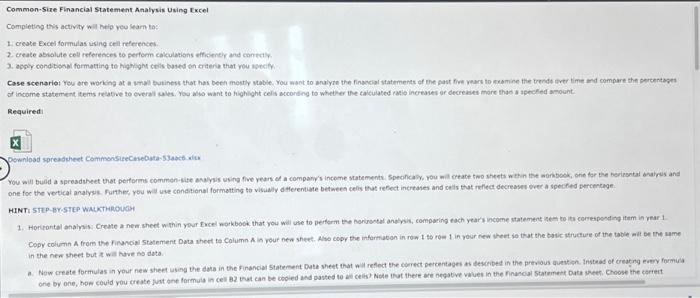
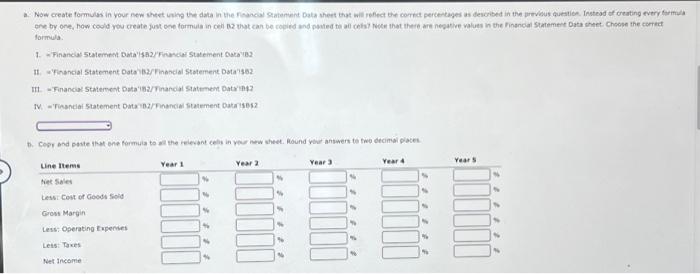
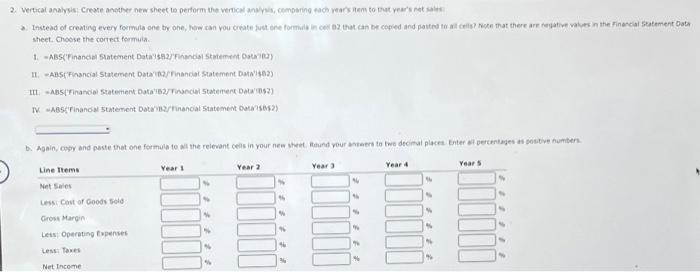
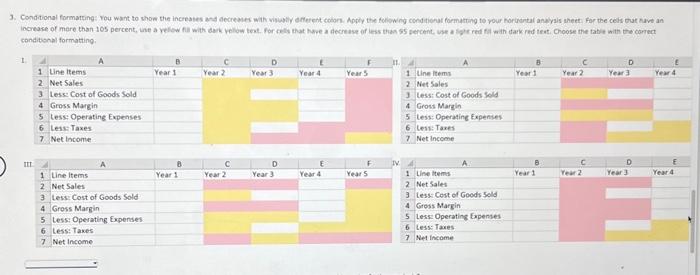
Common-Size Financial Statement Analysis Using Excel Completing the activity wal heip veu leam ta? 1. cieate Excel formilas using cell references. 2. create abiolute cell references to perform calculations wfficenely and contciy. 3. appy condtopol formating to highighn ceis based en culeru that wou svecily. Requiredi pewnload spreadtheet Commonsirecisebuta-s3ack aitu HINTI Step-Br-step WMiktheouch in the nex sheet but t wat have no dota. formula It. WFinancial Statement DataB2/Finandal Stotement Dsta'se2 II. - Financial Statement Deta'2/rinancial Statement Dutrimeq? IV = Ficandai statement DMa'B2/hnancial statement batarses? sheet. choose the contect fermis. III. =Abs(Tinamoial Statement Data'isrinoncal statertert Dalarimsz) conditiseal formatting 1. 4. Explain the use of the common size financial statements. If you were a manager, which area would require further analysis? The input in the box below will not be graded, but may be reviewed and considered by your instructor
Step by Step Solution
There are 3 Steps involved in it

Get step-by-step solutions from verified subject matter experts
 Study Help