







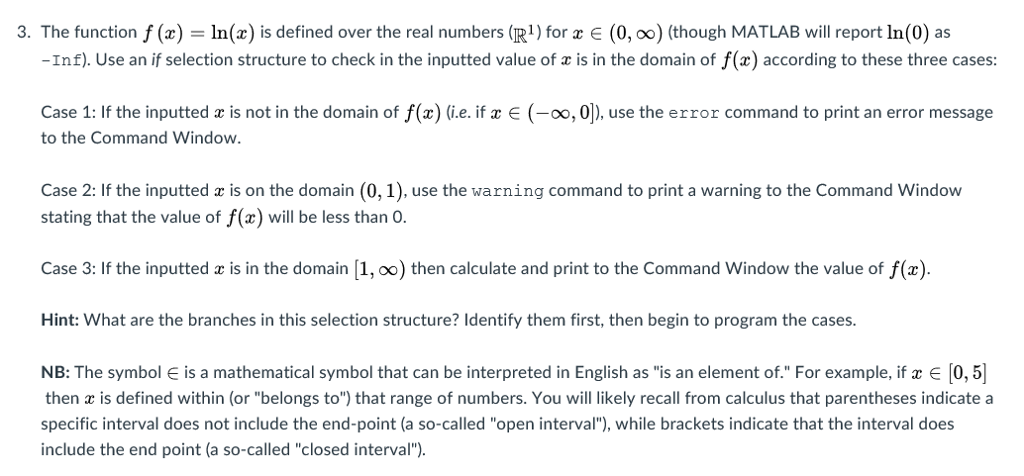
Question: Complete Problem 1 and Problem 3 in MATLAB Create a single script (.m file) to complete this assignment. Unless directed otherwise, use meaningful variable names
Complete Problem 1 and Problem 3 in MATLAB
Create a single script (.m file) to complete this assignment. Unless directed otherwise, use meaningful variable names for each variable; do not use the default variable ans to store your results. For this assignment suppress your output with semi-colons (;). Each problem (i.e. Problem 1 and Problem 3) should be in a separate cell, using the cell mode feature of MATLAB; the subparts should all be contained in the same cell as the parent problem.
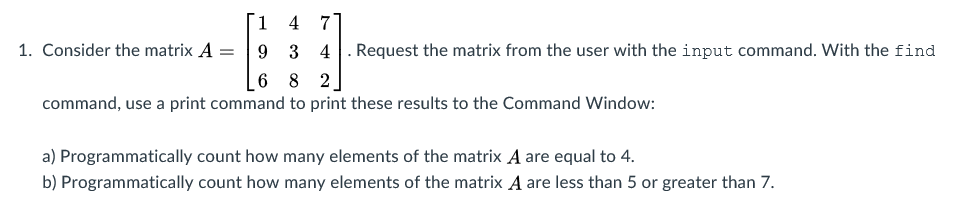
T 1 4 7 1. Consider the matrix A 9 3 4 Request the matrix from the user with the input command. With the find 6 8 2 command, use a print command to print these results to the Command Window: a) Programmatically count how many elements of the matrix A are equal to 4. b) Programmatically count how many elements of the matrix A are less than 5 or greater than 7
Step by Step Solution
There are 3 Steps involved in it

Get step-by-step solutions from verified subject matter experts
 Study Help