







Question: complete the code File Edit Format Run Options Window from tkinter import Label, Tk class Sign (Tk): Help def init (self, parent-None): Tk.init_(self, parent) self.
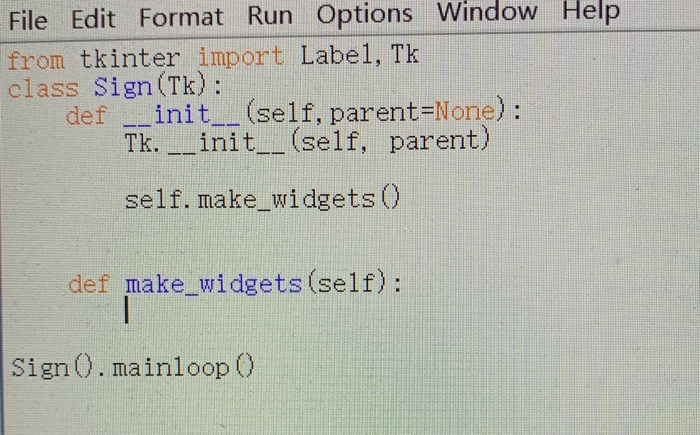
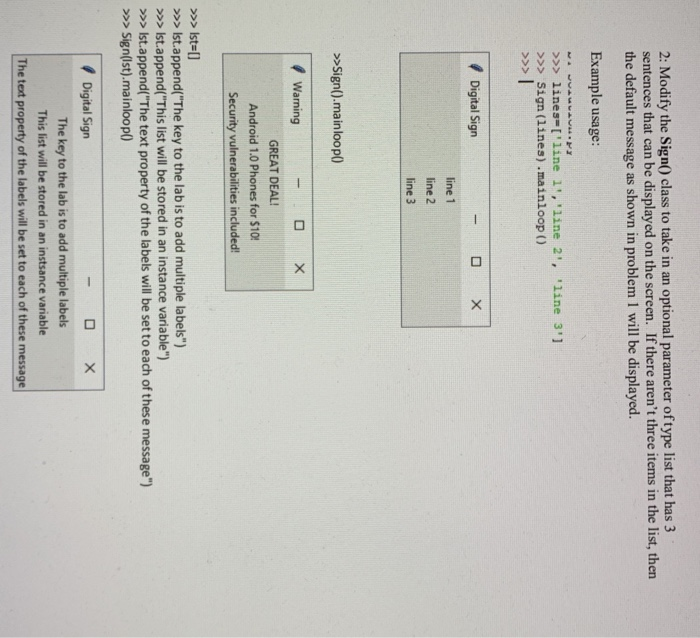
File Edit Format Run Options Window from tkinter import Label, Tk class Sign (Tk): Help def init (self, parent-None): Tk.init_(self, parent) self. make widgets O def make widgets(self): Sign 0. mainloop 0 2: Modify the Sign) class to take in an optional parameter of type list that has 3 sentences that can be displayed on the screen. If there aren't three items in the list, then the default message as shown in problem 1 will be displayed. Example usage: >>lines-I'line 1', 'line 2, '1ine 3'] >> Sign (lines) .mainloop () / Digital Sign line 1 line 2 line 3 >>Sign().mainloop) / Warning GREAT DEAL! Android 1.0 Phones for $10 Security vulnerabilities included > Ist- >Ist.append("The key to the lab is to add multiple labels") >Ist.append("This list will be stored in an instance variable") Ist.append("The text property of the labels will be set to each of these message") >Signlst).mainloop) The key to the lab is to add multiple labels This list will be stored in an instsance variable The text property of the labels will be set to each of these message
Step by Step Solution
There are 3 Steps involved in it

Get step-by-step solutions from verified subject matter experts
 Study Help