







Question: Gui help python here is my function code #example of using a dictionary to store words and translations from tkinter import filedialog from tkinter import
Gui help python
here is my function code
#example of using a dictionary to store words and translations from tkinter import filedialog from tkinter import * root = Tk() root.withdraw() root.filename = filedialog.askopenfilename(initialdir = "/", title = "Select file", filetypes = (("txt files","*.txt"),("all files","*.*"))) # This will get a file path and name. print (root.filename) infile = open(root.filename, "r") #This will open a file with ?read? only. #str=infile.read() #This will read all content then save it to a variable ?str? #print(str) # This will print the content of the file. #str=infile.read() (1) Make coment this line #print(str) (2) Make coment this line # (3) Add from below lines for ?TranslationDictionary.py (2) translationDictionary = dict() # prepare an empty dictionary print("Dictionary is prepareing! Would you wait!") #i=1 # for trace, we will make this as comment later. try: # try below for line in infile.readlines(): # This will read each line line = line.strip() # get rid of newline charactes index = line.find('=') # find the position of = sign, wordOne = line[0:index] # separate each word_1. wordTwo = line[index+1:] # separate each word_2. wordOne = wordOne.strip(' ') # get rid of extra spaces wordTwo = wordTwo.strip(' ') # get rid of extra spaces translationDictionary[wordOne] = wordTwo #store in dictionary #print(i) # trace each line is completed. #i=i+1 except: # in case of exception print(root.filename + " can not be processed") finally: # once you done try, infile.close() # close file print("done!") while True: englishWord = input("Enter an English word(x toexit): ") if englishWord == "x": break if englishWord in translationDictionary: print(englishWord, "translates to ", translationDictionary[englishWord]) else: print(englishWord, "is not in the dictionary. Try other words.") print("Thank you for using our dictionary. Bye!") 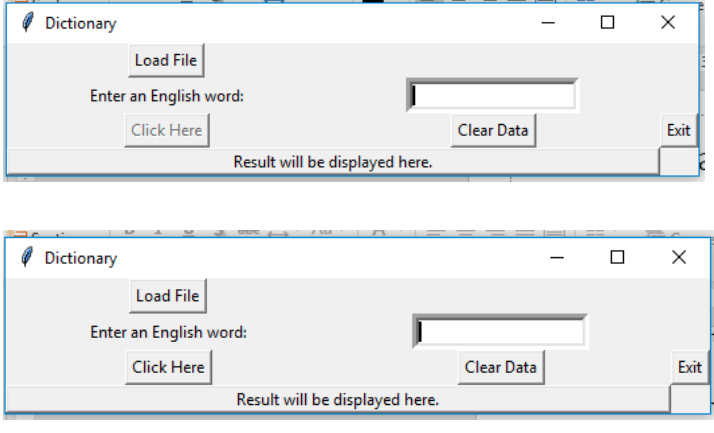
Starting code for the gui
from tkinter import * from tkinter import filedialog
class TranslationDictionary : def __init__ (self, parent): self.loadFile = Button(parent, text ="Load File", command = self.buttCallLoadFile) self.loadFile.grid(row=0) #put button on right si
#prepare an empty dictionary self.translationDictionary = dict()
# Code to add widgets will go here... self.L1 = Label(parent, text="Enter an English word:") # a Label self.L1.grid(row=1, column=0)
#develop your own codes #... root = Tk() root.title('Dictionary') Dictionary= TranslationDictionary(root) root.mainloop()
Dictionary Load File Enter an English word: Click Here Exit Result will be displayed here. WI Dictionary Load File Enter an English word Click Here Clear Data Exit Result will be displayed here. Dictionary Load File Enter an English word: Click Here Exit Result will be displayed here. WI Dictionary Load File Enter an English word Click Here Clear Data Exit Result will be displayed here
Step by Step Solution
There are 3 Steps involved in it

Get step-by-step solutions from verified subject matter experts
 Study Help