







Question: Complete the first 6 steps of the programming process. 1. Clearly define what the application is to do. 2. Visualize the application and design its
Complete the first 6 steps of the programming process.
1. Clearly define what the application is to do. 2. Visualize the application and design its user interface. 3. Determine the controls needed. 4. Define the values of each control's relevant propoerties. 5. Determine the event handlers and other code needed for each control. 6. Create a pseudocode versino of the code.
Note: This project will be completed in Visual Basic and I have already completed the first two steps. I'm not sure on step 3, 4, 5, and 6.
3. Determine the controls needed.
So far I have:
| Type | Name | Description |
| Form | (default) | A small form that will serve as the window onto which the other controls will be placed. |
| ListBox | 1stOutput | Displays the results, after the btnCalculate button has been clicked. |
| Button | btnCalculate | When clicked, the English translation of the word is shown with a middle left alignment. |
| Button | btnExit | When clicked, terminates the application. |
4. Define the values of each control's relevant properties.
So far I have:
| Control Type | Control Name | Text |
| Form | (default) | Distance Calculator |
| ListBox | 1stOutput | Empty or |
| Button | btnCalculate | Calculate |
| Button | btnExit | Exit |
5. Determine the event handlers and other code needed for each control.
So far I have:
| Method/ Event Handler Name | Description |
| btnCalculate_Click | Multiplies the speed by the time vehicle travelled; these values are retrieved from the InputBox of inSpeed and inTime. |
| btnExit_Click | Closes the application. |
6. Create a pseudocode version of the code.
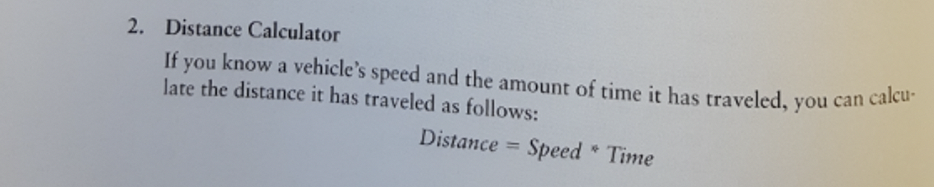
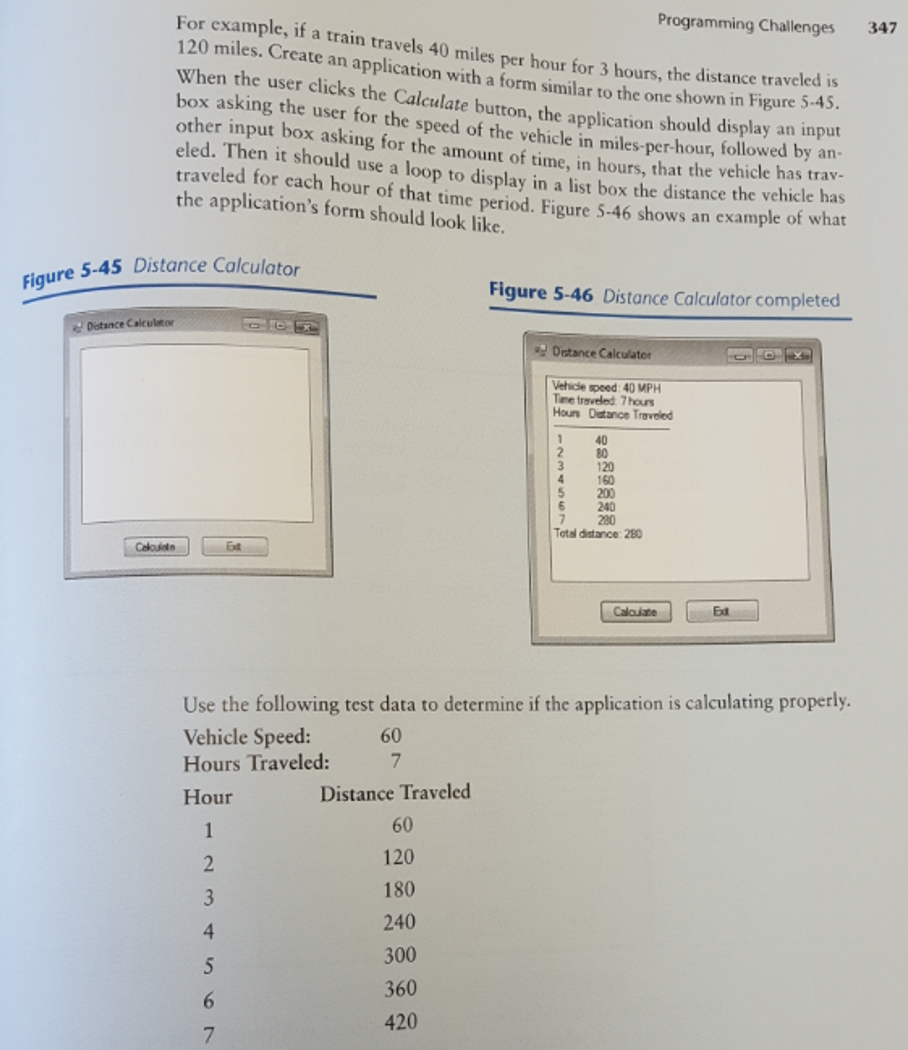
2. Distance Calculator If you know a vehicle's speed and the amount of time it has traveled, you can calcu- late the distance it has traveled as follows: Distance = Speed * Time Programming Challenges 347 For example, if a train travels 40 miles per hour for 3 hours, the distance traveled is 120 miles. Create an application with a form similar to the one shown in Figure 5.45. When the user clicks the Calculate button, the application should display an input box asking the user for the speed of the vehicle in miles-per-hour, followed by an other input box asking for the amount of time, in hours, that the vehicle has tray- eled. Then it should use a loop to display in a list box the distance the vehicle has traveled for cach hour of that time period. Figure 5-46 shows an example of what the application's form should look like. Figure 5-45 Distance Calculator Figure 5-46 Distance Calculator completed Datance Calculator Distance Calculator Vehicle speed 40 MPH Time traveled 7 hours Houn Datance Traveled 1 40 2 80 3 120 4 160 5 200 6 240 7 220 Total distance: 280 Clouis Calculate Ed Use the following test data to determine if the application is calculating properly. Vehicle Speed: 60 Hours Traveled: 7 Hour Distance Traveled 1 60 2. 120 3 180 4 240 5 300 6 360 7 420
Step by Step Solution
There are 3 Steps involved in it

Get step-by-step solutions from verified subject matter experts
 Study Help