







Question: Complete the master inventory record using the math functionality of Sheets / Excel . information: REQUIRED FOR POINTS: 2 calculations and reference / link to
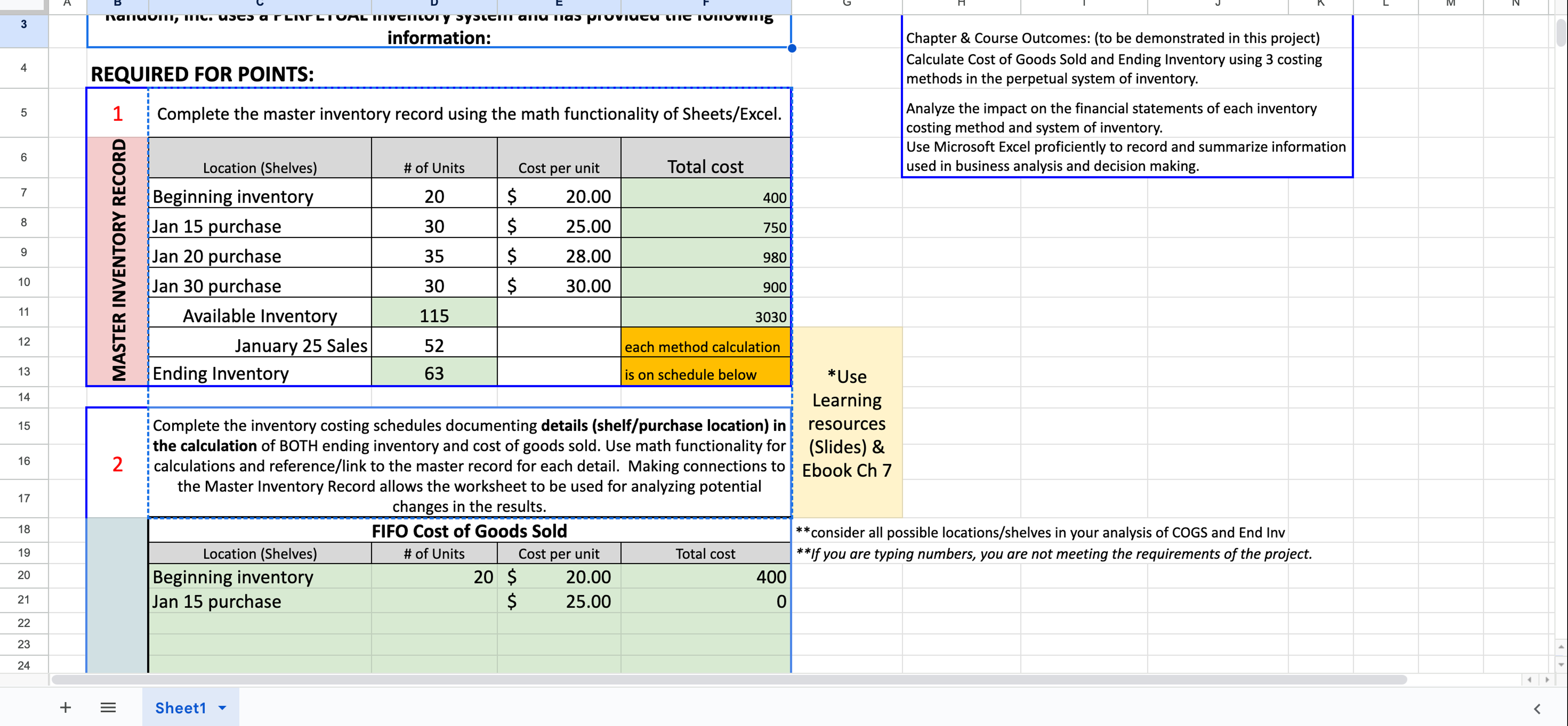
Complete the master inventory record using the math functionality of SheetsExcel information:
REQUIRED FOR POINTS:
calculations and referencelink to the master record for each detail. Making connections to
the Master Inventory Record allows the worksheet to be used for analyzing potential
changes in the results.
Chapter & Course Outcomes: to be demonstrated in this project
Calculate Cost of Goods Sold and Ending Inventory using costing
methods in the perpetual system of inventory.
Analyze the impact on the financial statements of each inventory
costing method and system of inventory.
Use Microsoft Excel proficiently to record and summarize information
used in business analysis and decision making.
Use
Learning
resources
Slides &
Ebook Ch
consider all possible locationsshelves in your analysis of COGS and End Inv
If you are typing numbers, you are not meeting the requirements of the project. C:F
Sheet Project # Inventory CostingAllison Schultz
Share
C:F
Answer the following questions using the above information: double click in the answer box and begin typing your answer; enter when done
Sheet
Location Shelves # of Units Cost per unit Total cost
Beginning inventory $
Jan purchase $
Jan purchase $
Jan purchase $
Available Inventory
January Sales each method calculation
Ending Inventory is on schedule below
Complete the inventory costing schedules documenting details shelfpurchase location in the calculation of BOTH ending inventory and cost of goods sold. Use math functionality for calculations and referencelink to the master record for each detail. Making connections to the Master Inventory Record allows the worksheet to be used for analyzing potential changes in the results.
Step by Step Solution
There are 3 Steps involved in it
1 Expert Approved Answer
Step: 1 Unlock

Question Has Been Solved by an Expert!
Get step-by-step solutions from verified subject matter experts
Step: 2 Unlock
Step: 3 Unlock
 Study Help