







Question: -Computer Engineering import turtle t= (2 point(s)) #create a canvas def circle(size, filled): if filled == True: ( 2 point(s) )#begin to fill ( 2
-Computer Engineering 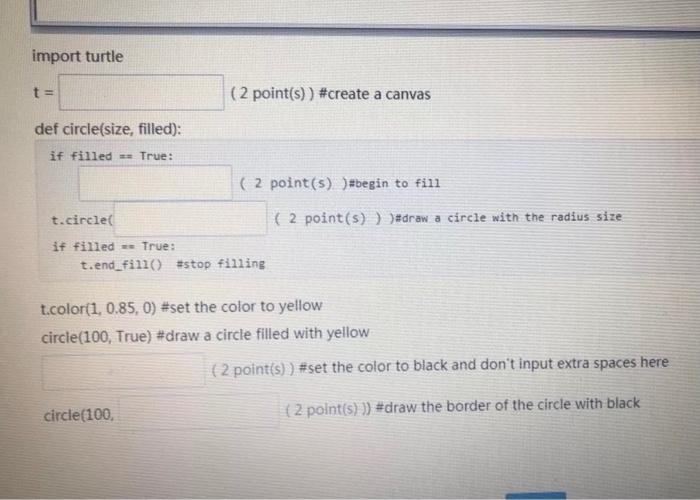
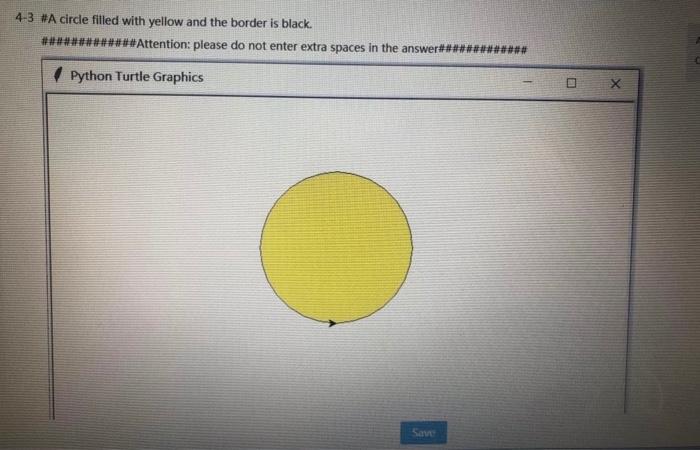
import turtle t= (2 point(s)) #create a canvas def circle(size, filled): if filled == True: ( 2 point(s) )#begin to fill ( 2 point(s) ) )#draw a circle with the radius size t.circle it filled == True: t.end_fill() #stop filling t.color(1, 0.85, 0) #set the color to yellow circle(100, True) #draw a circle filled with yellow { 2 point(s) ) #set the color to black and don't input extra spaces here circle(100 (2 point(s) )) #draw the border of the circle with black 4-3 #A circle filled with yellow and the border is black. #*****##Attention: please do not enter extra spaces in the answer### ### Python Turtle Graphics X Save
Step by Step Solution
There are 3 Steps involved in it
1 Expert Approved Answer
Step: 1 Unlock

Question Has Been Solved by an Expert!
Get step-by-step solutions from verified subject matter experts
Step: 2 Unlock
Step: 3 Unlock
 Study Help