







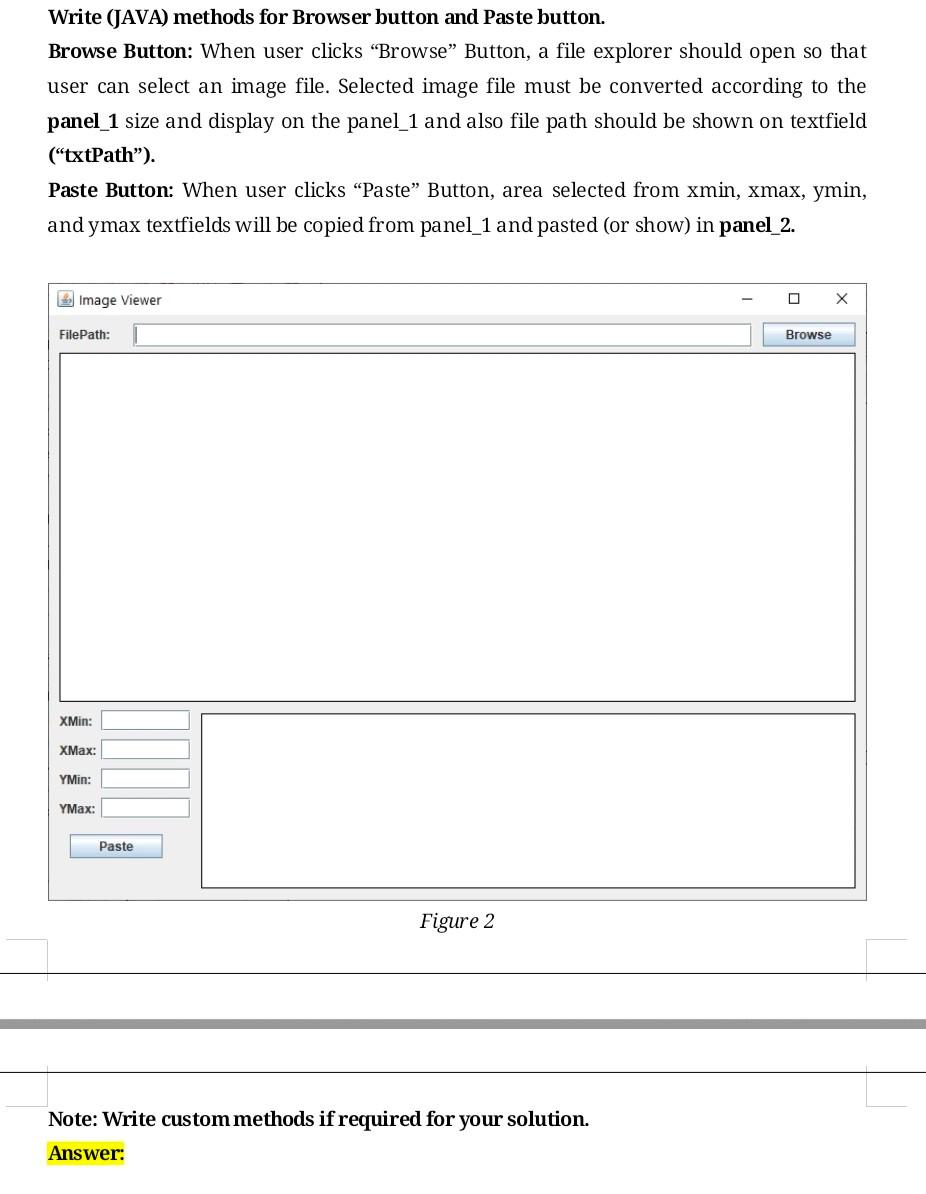
Question: computer graphics Write (JAVA) methods for Browser button and Paste button. Browse Button: When user clicks Browse Button, a file explorer should open so that
computer graphics
Write (JAVA) methods for Browser button and Paste button. Browse Button: When user clicks Browse Button, a file explorer should open so that user can select an image file. Selected image file must be converted according to the panel_1 size and display on the panel_1 and also file path should be shown on textfield ("txtPath"). Paste Button: When user clicks "Paste" Button, area selected from xmin, xmax, ymin, and ymax textfields will be copied from panel_1 and pasted (or show) in panel_2. Image Viewer X FilePath: Browse XMin: XMax: Y Min: : Paste Figure 2 Note: Write custom methods if required for your solution
Step by Step Solution
There are 3 Steps involved in it
1 Expert Approved Answer
Step: 1 Unlock

Question Has Been Solved by an Expert!
Get step-by-step solutions from verified subject matter experts
Step: 2 Unlock
Step: 3 Unlock
 Study Help