





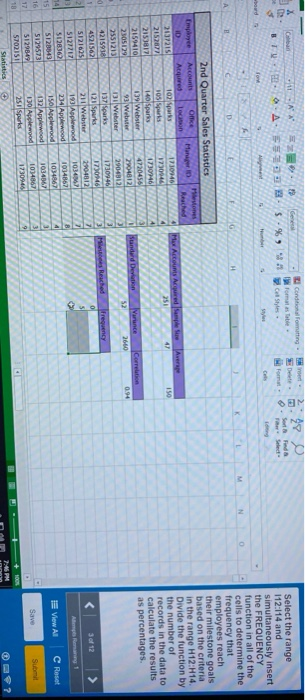
Question: conditional Formatting - promote Styles OM . A - S -% 9 Select the range 112:114 and simultaneously insert the FREQUENCY function in all of
conditional Formatting - promote Styles OM . A -
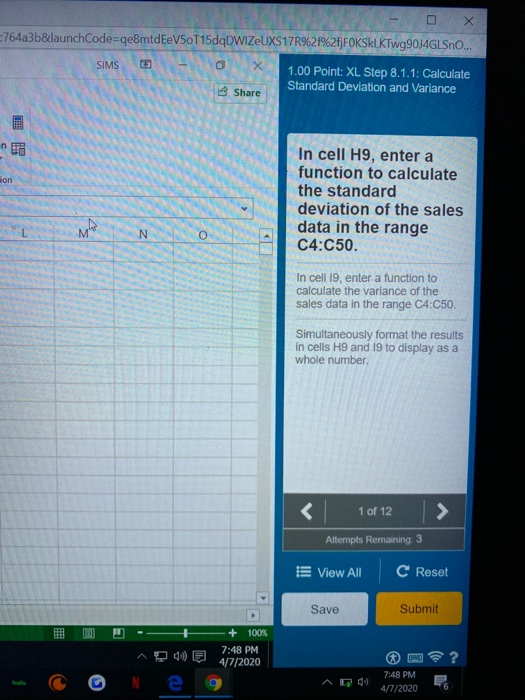
conditional Formatting - promote Styles OM . A - S -% 9 Select the range 112:114 and simultaneously insert the FREQUENCY function in all of the cells to determine the frequency that employees reach their milestone goals based on the criteria in the range H1214 Divide the function by the number of records in the data to calculate the results as percentages. 2nd Quarter Sales Statistics Employee ones H Account 2037215 2152871 21538171 215941 Standard Devletion a runte Correction Wet Meses Reached frequency 1 02 parts 171020 105 Sparks 1230046 1730946 139 Webster 4720456 93 Webster 2904812 137 Sparks 1730946 121 Spurs 1730146 211 Webster 19 Apred 1034 2 34 Applewood 10948628 1 50 Aplwood1034807 032 Applewood 10340673 1 30 Applewood 1034867 3 251 Spurles 17309469 E View All C Reset Save Sub - DX 764a3b&launchCode=qe8mtdEeV50T15dqDWIZUXS17R%2f%2f|FOKSKLKTWg9034GLSO..! SIMS 1.00 Point: XL Step 8.1.1: Calculate Share Standard Deviation and Variance no lon In cell H9, enter a function to calculate the standard deviation of the sales data in the range C4:C50. In cell 19, enter a function to calculate the variance of the sales data in the range C4C50. Simultaneously format the results in cells H9 and 19 to display as a whole number. Attempts Remaining: 3 E View All C Reset Save Submit + 100% 1 00 = 7:48 PM AD 7:48 PM A01/2020 6 conditional Formatting - promote Styles OM . A - S -% 9 Select the range 112:114 and simultaneously insert the FREQUENCY function in all of the cells to determine the frequency that employees reach their milestone goals based on the criteria in the range H1214 Divide the function by the number of records in the data to calculate the results as percentages. 2nd Quarter Sales Statistics Employee ones H Account 2037215 2152871 21538171 215941 Standard Devletion a runte Correction Wet Meses Reached frequency 1 02 parts 171020 105 Sparks 1230046 1730946 139 Webster 4720456 93 Webster 2904812 137 Sparks 1730946 121 Spurs 1730146 211 Webster 19 Apred 1034 2 34 Applewood 10948628 1 50 Aplwood1034807 032 Applewood 10340673 1 30 Applewood 1034867 3 251 Spurles 17309469 E View All C Reset Save Sub - DX 764a3b&launchCode=qe8mtdEeV50T15dqDWIZUXS17R%2f%2f|FOKSKLKTWg9034GLSO..! SIMS 1.00 Point: XL Step 8.1.1: Calculate Share Standard Deviation and Variance no lon In cell H9, enter a function to calculate the standard deviation of the sales data in the range C4:C50. In cell 19, enter a function to calculate the variance of the sales data in the range C4C50. Simultaneously format the results in cells H9 and 19 to display as a whole number. Attempts Remaining: 3 E View All C Reset Save Submit + 100% 1 00 = 7:48 PM AD 7:48 PM A01/2020 6

Step by Step Solution

There are 3 Steps involved in it

1 Expert Approved Answer
Step: 1 Unlock blur-text-image

Question Has Been Solved by an Expert!

Get step-by-step solutions from verified subject matter experts

Step: 2 Unlock
Step: 3 Unlock

Students Have Also Explored These Related General Management Questions!