



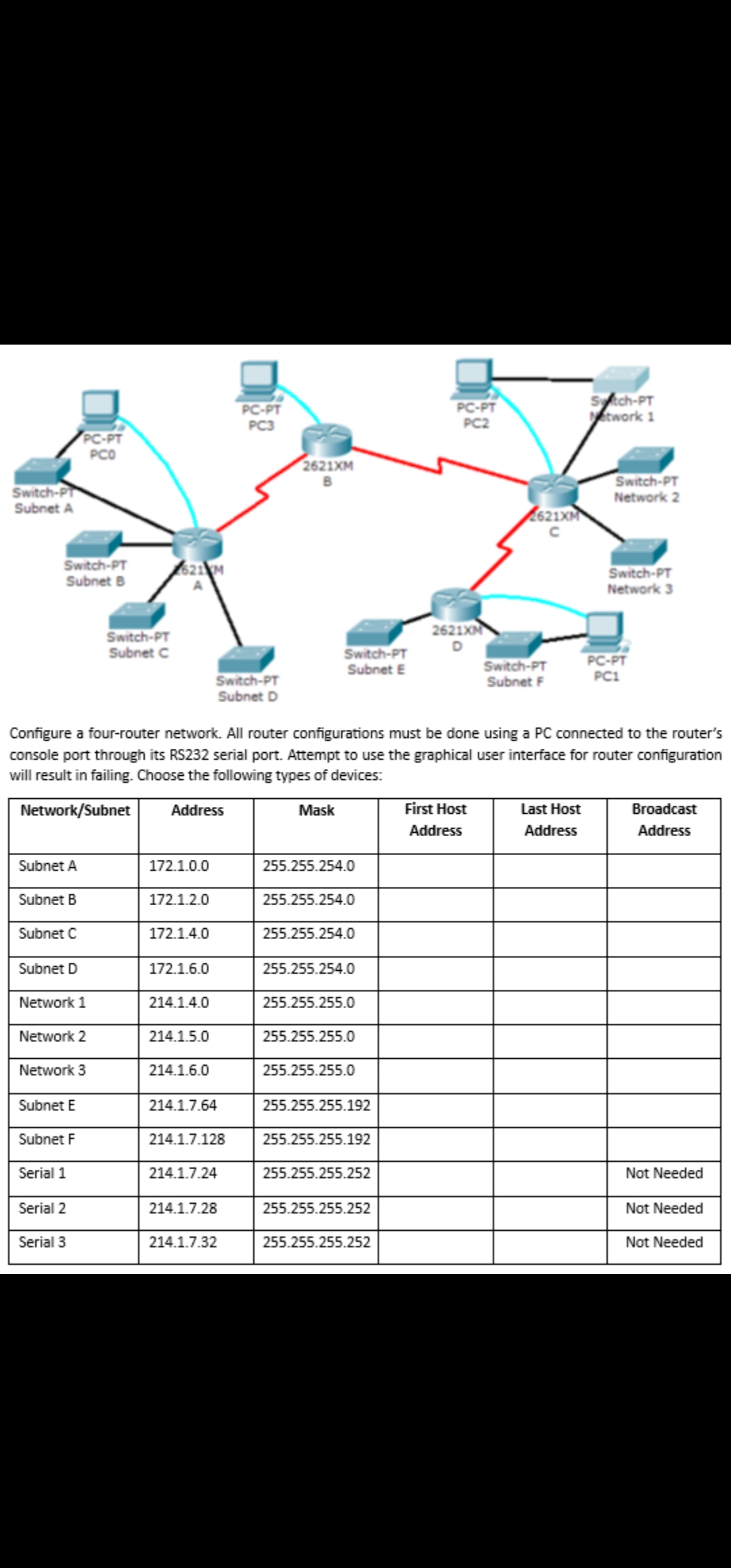
Question: Configure a four - router network. All router configurations must be done using a PC connected to the router's console port through its RS 2
Configure a fourrouter network. All router configurations must be done using a PC connected to the router's console port through its RS serial port. Attempt to use the graphical user interface for router configuration will result in failing. Choose the following types of devices:
tableNetworkSubnetAddress,Mask,tableFirst HostAddresstableLast HostAddresstableBroadcastAddressSubnet ASubnet BSubnet CSubnet DNetwork Network Network Subnet ESubnet FNot NeededSerial Not NeededSerial Not NeededSerial
Step by Step Solution
There are 3 Steps involved in it
1 Expert Approved Answer
Step: 1 Unlock

Question Has Been Solved by an Expert!
Get step-by-step solutions from verified subject matter experts
Step: 2 Unlock
Step: 3 Unlock