







Question: Consider the code for the Python UDP client and the Python UDP server we discussed in the class (code listed below). Modify the code (there
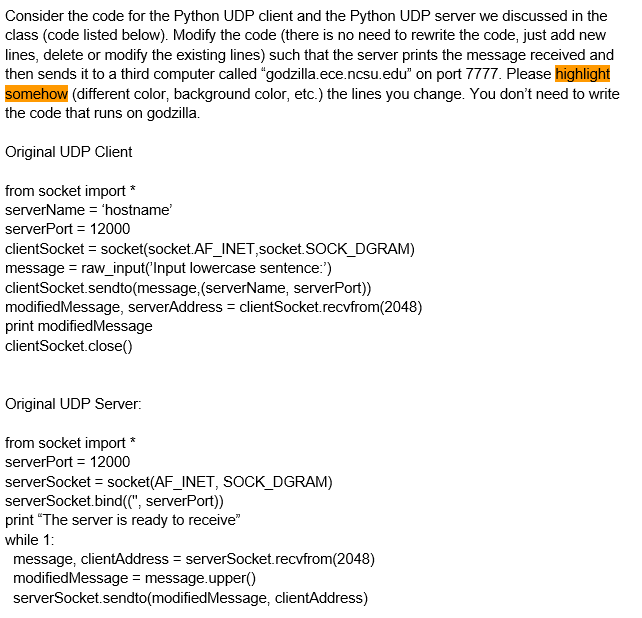
Consider the code for the Python UDP client and the Python UDP server we discussed in the class (code listed below). Modify the code (there is no need to rewrite the code, just add new lines, delete or modify the existing lines) such that the server prints the message received and then sends it to a third computer called "godzilla.ece.ncsu.edu" on port 7777. Please highlight somehow (different color, background color, etc.) the lines you change. You don't need to write the code that runs on godzilla. Original UDP Client from socket import * serverName = "hostname' serverPort = 12000 clientSocket = socket(socket.AF_INET, socket. SOCK_DGRAM) message = raw_input('Input lowercase sentence:') client Socket.sendto(message, (serverName, serverPort)) modified Message, serverAddress = client Socket.recvfrom(2048) print modified Message clientSocket.close() Original UDP Server: from socket import * serverPort = 12000 serverSocket = socket(AF_INET, SOCK_DGRAM) serverSocket.bind(C", serverPort)) print "The server is ready to receive" while 1: message, clientAddress = serverSocket.recvfrom(2048) modified Message = message.upper() serverSocket.sendto(modified Message, clientAddress)
Step by Step Solution
There are 3 Steps involved in it

Get step-by-step solutions from verified subject matter experts
 Study Help