







Question: Console.WriteLine(----------------------------); console.WriteLine(CHOOSE AN OPTION TO CONTINUE:); Select int.Parse(Console.ReadLine()); if (select ==0)//This part quits the program break; switch (select) {case 1://Opening a new checking account//Get the
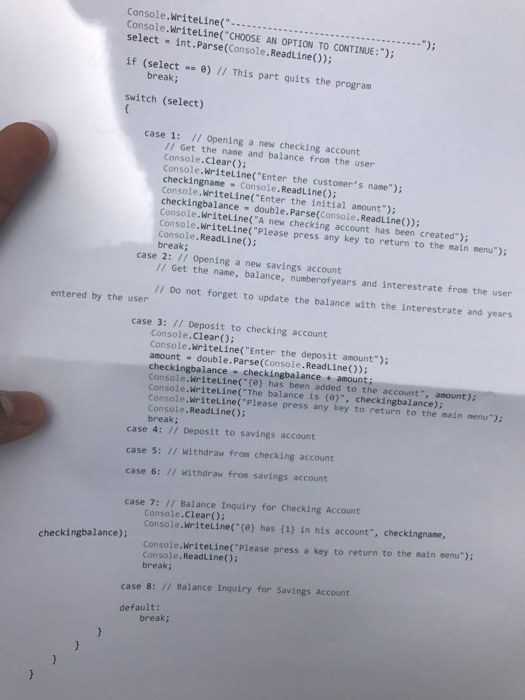
Console.WriteLine("----------------------------"); console.WriteLine("CHOOSE AN OPTION TO CONTINUE:"); Select int.Parse(Console.ReadLine()); if (select ==0)//This part quits the program break; switch (select) {case 1://Opening a new checking account//Get the name and balance from the user Console.Clear(); Console.WriteLine("Enter the customer's name"); checkingname = Console.ReadLine(); Console.WriteLine("Enter the initial amount"); checkingbalance = double.Parse(Console.ReadLine()); Console.WriteLine("A new checking account has been creadted"); Console.WriteLine("Please press any key to return to the main menu"); console.ReadLine(); break; case 2://Opening a new savings account//Get the name, balance, numberofyears and interestrate from the user//Do not forget to update the balance with the interestrate and years entered by the user case 3://Deposit to checking account Console.Clear(); console.WriteLine("Enter the deposit amount"); amount = double.Parse(Console.ReadLine()); checking balance = checkingbalance + amount; Console.WriteLine("{0} has been added to the account", amount); Console.WriteLine ("the balance is {0}", checkingbalance); Console.WriteLine("Please press any key to return to the main menu"); break; case 4://Deposit to savings account case 5://withdraw from checking account case 6://Withdraw from savings account case 7://Balance Inquiry for Checking Account Console.Clear(); Console.WriteLine("{0} has {1} in his account", checkingname, checkingbalance); Console.WriteLine("Please press a key to return to the main menu"); break case 8://Balance Inquiry for Savings Account default: break;}}}}
Step by Step Solution
There are 3 Steps involved in it

Get step-by-step solutions from verified subject matter experts
 Study Help