







Question: Convert the following IPv6 address given in binary to its canonical text representation shown in step 1. 11010011 00000101 11111100 10101010 00000000 11000000 11100111
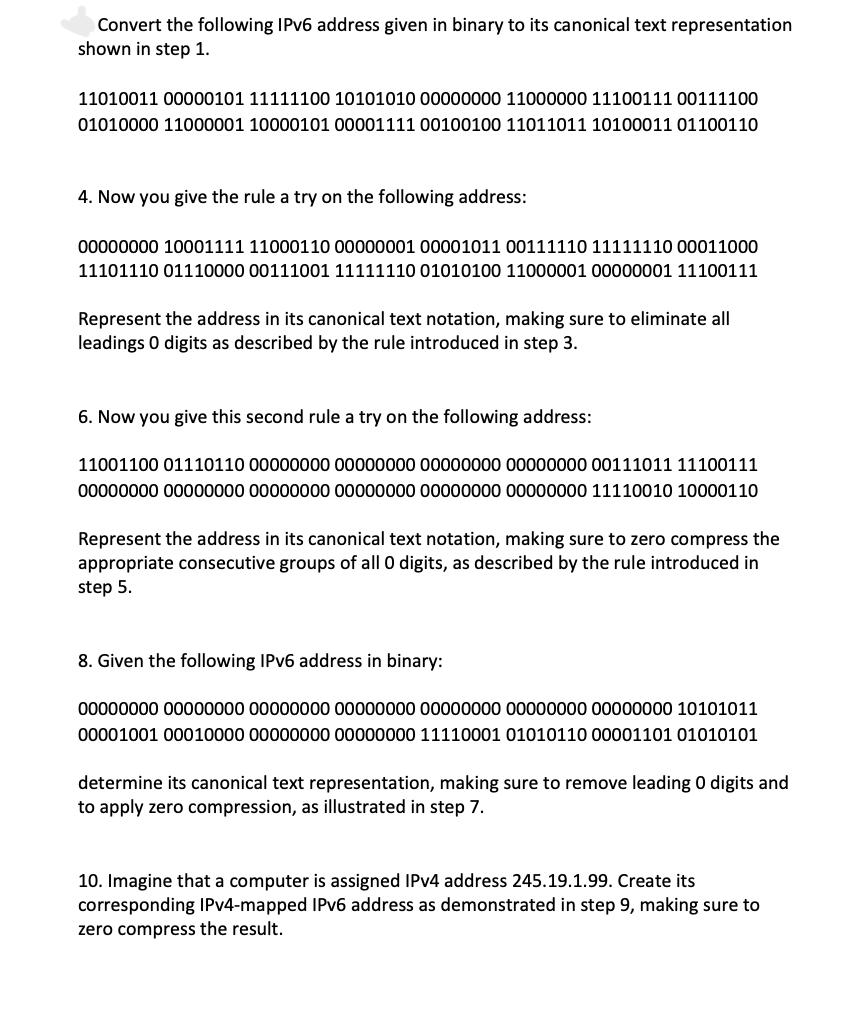
Convert the following IPv6 address given in binary to its canonical text representation shown in step 1. 11010011 00000101 11111100 10101010 00000000 11000000 11100111 00111100 01010000 11000001 10000101 00001111 00100100 11011011 10100011 01100110 4. Now you give the rule a try on the following address: 00000000 10001111 11000110 00000001 00001011 00111110 11111110 00011000 11101110 01110000 00111001 11111110 01010100 11000001 00000001 11100111 Represent the address in its canonical text notation, making sure to eliminate all leadings 0 digits as described by the rule introduced in step 3. 6. Now you give this second rule a try on the following address: 11001100 01110110 00000000 00000000 00000000 00000000 00111011 11100111 00000000 00000000 00000000 00000000 00000000 00000000 11110010 10000110 Represent the address in its canonical text notation, making sure to zero compress the appropriate consecutive groups of all 0 digits, as described by the rule introduced in step 5. 8. Given the following IPv6 address in binary: 00000000 00000000 00000000 00000000 00000000 00000000 00000000 10101011 00001001 00010000 00000000 00000000 11110001 01010110 00001101 01010101 determine its canonical text representation, making sure to remove leading 0 digits and to apply zero compression, as illustrated in step 7. 10. Imagine that a computer is assigned IPv4 address 245.19.1.99. Create its corresponding IPv4-mapped IPv6 address as demonstrated in step 9, making sure to zero compress the result.
Step by Step Solution
There are 3 Steps involved in it
Lets go through each step to convert the binary IPv6 addresses to their canonical text representation and apply zero compression where applicable Step ... View full answer

Get step-by-step solutions from verified subject matter experts
 Study Help