







Question: could you please help with this I can't figure out the format ercise Cycles Company has provided its year ended accounts recelvables that were uncollected.
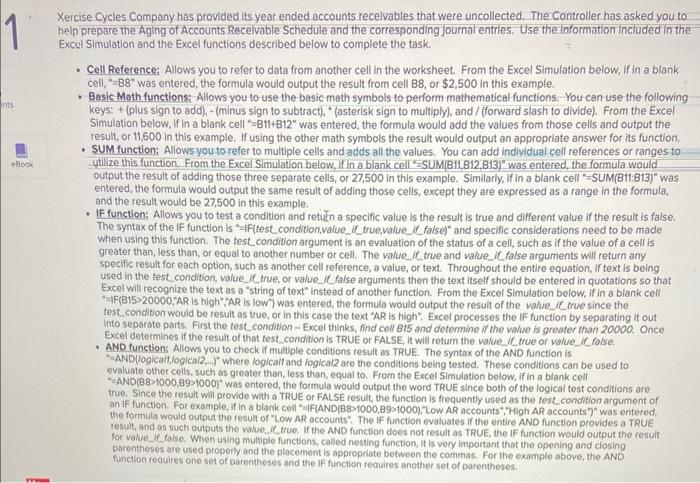
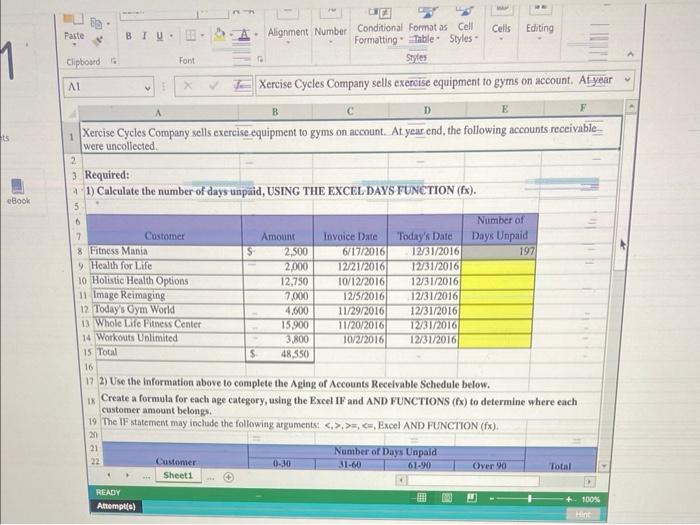
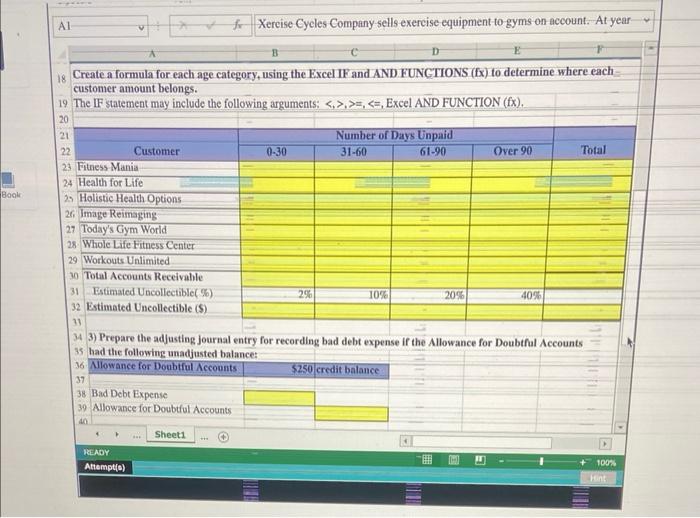
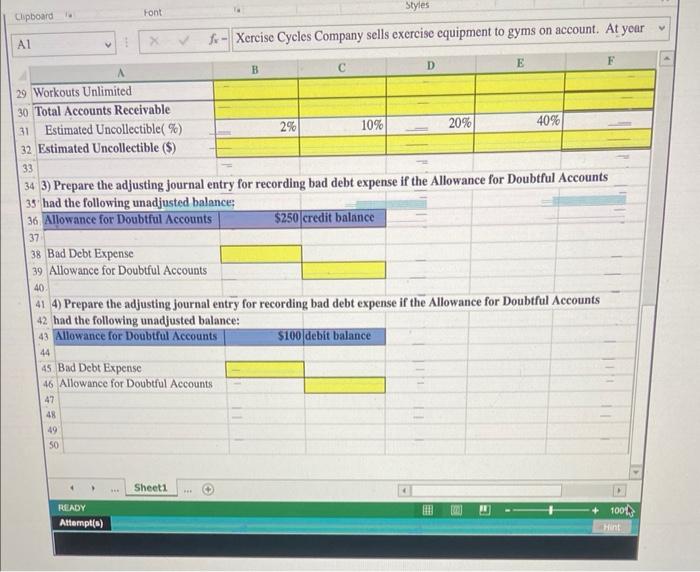
ercise Cycles Company has provided its year ended accounts recelvables that were uncollected. The Controller has asked you to elp prepare the Aging of Accounts Recelvable Schedule and the corresponding Journal entries. Use the information included in the x xel Simulation and the Excel functions described below to complete the task. - Cell Reference: Allows you to refer to data from another cell in the worksheet From the Excel Simulation below, if in a blank cell, "=B8" was entered, the formula would output the result from cell B8, or $2,500 in this example. - Basic Math functions: Allows you to use the basic mathsymbols to perform mathematical functions. You can use the following keys: + (plus sign to add). - (minus sign to subtract), "(asterisk sign to multiply), and/(forward slash to divide). From the Excel Simulation below, if in a blank cell "=B11+B12" was entered, the formula would add the values from those cells and output the result, or 11,600 in this example. If using the other math symbols the result would output an appropriate answer for its function. - SUM function: Allows you to refer to multiple cells and adds all the values. You can add indlividual cell references or ranges to ytlize this function. From the Excel Simulation below, if In a blank cell "SUM(B11,B12,B13)" was entered, the formula would output the result of adding those three separate cells, or 27,500 in this example. Similarly, if in a blank cell "=SUM(B11:B13)" was entered, the formula would output the same result of adding those cells, except they are expressed as a range in the formula, and the result would be 27,500 in this example. - IF function: Allows you to test a condition and retuln a specific value is the result is true and different value if the result is false. The syntax of the IF function is "=IF(test_condition,value_if_true,value_if_false)" and specific considerations need to be made when using this function. The fest condition argument is an evaluation of the status of a cell, such as if the value of a cell is greater than, less than, or equal to another number or cell. The value, if true and value_ if false arguments will return any specific result for each option, such as another cell reference, a value, or text. Throughout the entire equation, if text is being used in the test condition, value_ if_true, or value, if_false arguments then the text itself should be entered in quotations so that Excel will recognize the text as a "string of text" instead of another function. From the Excel Simulation below, if in a blank cell "=IF(B15>20000,"AR is high"."AR is low") was entered, the formula would output the result of the value_if true since the test. condition would be result as true, or in this case the text "AR is high". Excel processes the IF function by separating it out into separate parts. First the test condition - Excel thinks, find cell B15 and dotermine if the value is greater than 20000. Once Excel determines if the result of that test condition is TRUE or FALSE, it will return the value, ic true or value, if false. - AND function: Allows you to check if multiple conditions result as TRUE. The syntax of the AND function is "anD(logicalt,logica/2,..)" where logicalf and logica/2 are the conditions being tested. These conditions can be used to evaluate other cells, such as greater then, less than, equal to. From the Excel Simulation below, If in a blank cell "AND(B8>1000,8991000) was entered, the formula would output the word TRUE since both of the logical test conditions are true. Since the result will provide with a TRUE or FALSE result, the function is frequently used as the test condition argument of an F function, For example, if in a blank cell "elf(AND(B8>1000,89s1000), "Low AR accounts", "High AR accounts")" was ontered. the formula would output the result of "LOW AR accounts". The IF function evaluates if the entire AND function provides a TRUE fosuit, and os such outputs the value il true. If the AND function does not result as TRUE, the IF function would output the result pacentheses sese when using multiple functions, called nesting function, it is very important that the opening and closing function reauires one set of parentheres apement is approptiate between the commas. For the example above, the AND function requires one set of parentheses and the IF function reaulies another set of parentheses. 2) Use the information above to complete the Aging of Accounts Receivable Schedule below. Create a formula for each age category, using the Excel IF and AND FUNCTIONS ( (x) to determine where each customer amount belongs. 19 The IF statement may include the following arguments: ,>=,;
Step by Step Solution
There are 3 Steps involved in it

Get step-by-step solutions from verified subject matter experts
 Study Help