







Question: Create a batch file named Userinfo.bat. The batch file must display information about a specific user account that exists on the computer. The output message
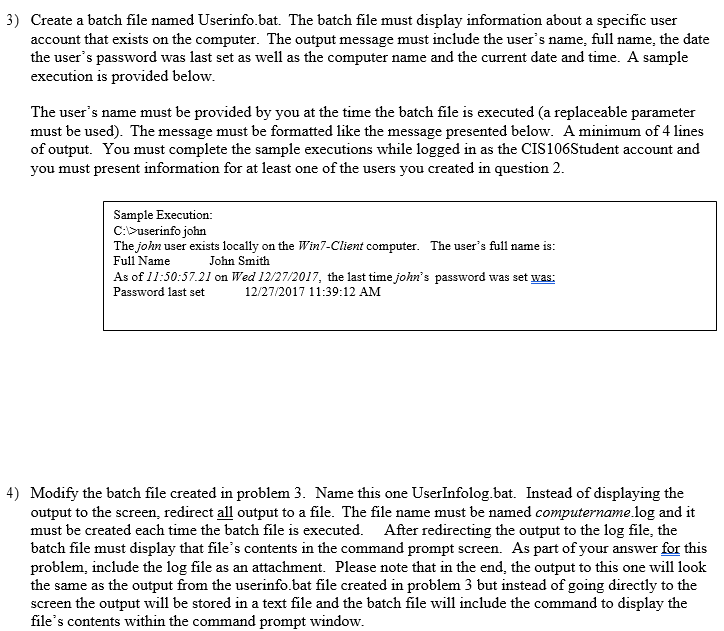
Create a batch file named Userinfo.bat. The batch file must display information about a specific user account that exists on the computer. The output message must include the user's name, full name, the date the user's password was last set as well as the computer name and the current date and time. A sample execution is provided below. The user's name must be provided by you at the time the batch file is executed (a replaceable parameter must be used). The message must be formatted like the message presented below. A minimum of 4 lines of output. You must complete the sample executions while logged in as the CIS106Student account and you must present information for at least one of the users you created in question 2. Modify the batch file created in problem 3. Name this one UserInfolog.bat. Instead of displaying the output to the screen, redirect all output to a file. The file name must be named computername.log and it must be created each time the batch file is executed. After redirecting the output to the log file, the batch file must display that file's contents in the command prompt screen. As part of your answer for this problem, include the log file as an attachment. Please note that in the end, the output to this one will look the same as the output from the userinfo.bat file created in problem 3 but instead of going directly to the screen the output will be stored in a text file and the batch file will include the command to display the file's contents within the command prompt window
Step by Step Solution
There are 3 Steps involved in it

Get step-by-step solutions from verified subject matter experts
 Study Help