



Question: Create a folder on the desktop of your VM called 'Week 8 Drill Down Report' and inside of this folder, include: 1 . The Visual
Create a folder on the desktop of your VM called 'Week Drill Down Report' and inside of this folder, include:
The Visual Studio project used to develop the report
The stored procedure used in the report
Develop a drill down report in SSRS This will:
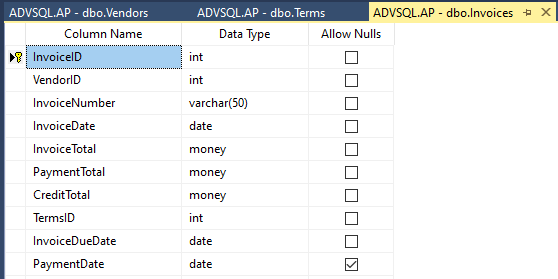
Through a stored procedure that will need to be developed, extract the APInvoices table data. This procedure will accept one parameter determine appropriate data type for this parameter that will be optional. If no parameter is passed to the stored procedure, retrieve all data from the Invoices table. If a parameter is supplied, pull back that particular invoice detail. The VendorId field will be used to toggle the drilldown functionality. Retrieve and display all data by default when the report first loads.
a Add a parent group that will have the Vendor field at a parent group
b The drilldown piece will display the rest of the information from the APInvoices table
c Data display requirements formatting data:
Display InvoiceDate, InvoiceDueDate and PaymentDate as yyyymmdd
Display InvoiceTotal, PaymentTotal and CreditTotal to two decimal places. Include the leading dollar sign.
Center all data in each cell
Ensure that all column headers are fully visible not truncated and are on single lines
Ensure that all objects are named appropriately.
Step by Step Solution
There are 3 Steps involved in it
1 Expert Approved Answer
Step: 1 Unlock

Question Has Been Solved by an Expert!
Get step-by-step solutions from verified subject matter experts
Step: 2 Unlock
Step: 3 Unlock