







Question: Create a form with inputs & selections as follows: First Name: Betty [Letters only, first letter capitalized.] Last Name: Betters [Letters only, first letter capitalized.]
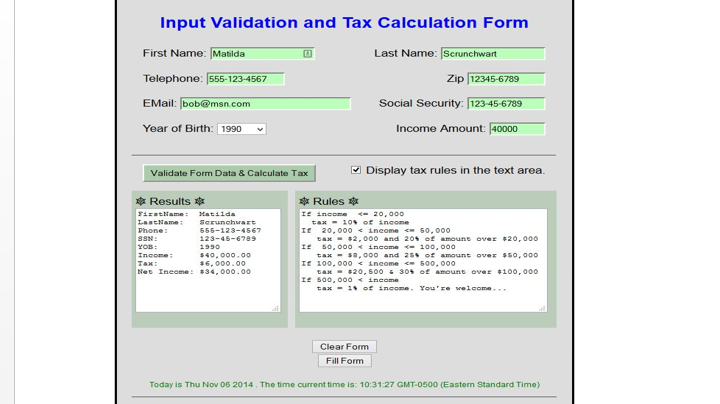
Create a form with inputs & selections as follows:
First Name: Betty [Letters only, first letter capitalized.]
Last Name: Betters [Letters only, first letter capitalized.]
Challenge: If first letter of name not capitalized, CAPITALIZE the first letter! (onblur, charAt, substr)
Telephone: 123-456-7890 [length 12, digits and hyphen separator only]
Zip: 12345 [length 10, digits only]
12345-7890 [length 10, digits and hyphen separator only] ? How do you reject 12345-22 ?
E-Mail: type="email"
SS#: 123-45-6789 [length 11, digits and hyphen separator only]
Income: 0-999999 [check for number, range ]
> text, password, email, tel, checkbox, radio, submit
id=" "
name=" "
size=" " maxlength=" "
title=" "
placeholder=" what the user sees"
pattern=" " ==>> regex quick start regex overview pattern reference!
tabindex=" "
required
/>
BirthDate: ONE Dropdown (Year): 1990-2000. Check? None
select
option
HAS TO LOOK SOMETHING LIKE THE PICTURE SEEN
Input Validation and Tax Calculation Form First Name: Matilda Last Name: Scrunchwart Zip 12345-6789 Social Security: 1123456789 Income Amount: 40000 123-4567 EMail: bob@msn.com Year of Birth: 1990 Validate Form Data & Calculate Tax Display tax rules in the text area Results * Rules * 50.000 990 ncome 6,000.00 00 income -c- 500, 00 Clear Form Fill Form Today is Thu Now 06 2014. The time current time is: 10:31:27 GMT-0500 (Eastern Standard Time)
Step by Step Solution
There are 3 Steps involved in it

Get step-by-step solutions from verified subject matter experts
 Study Help