







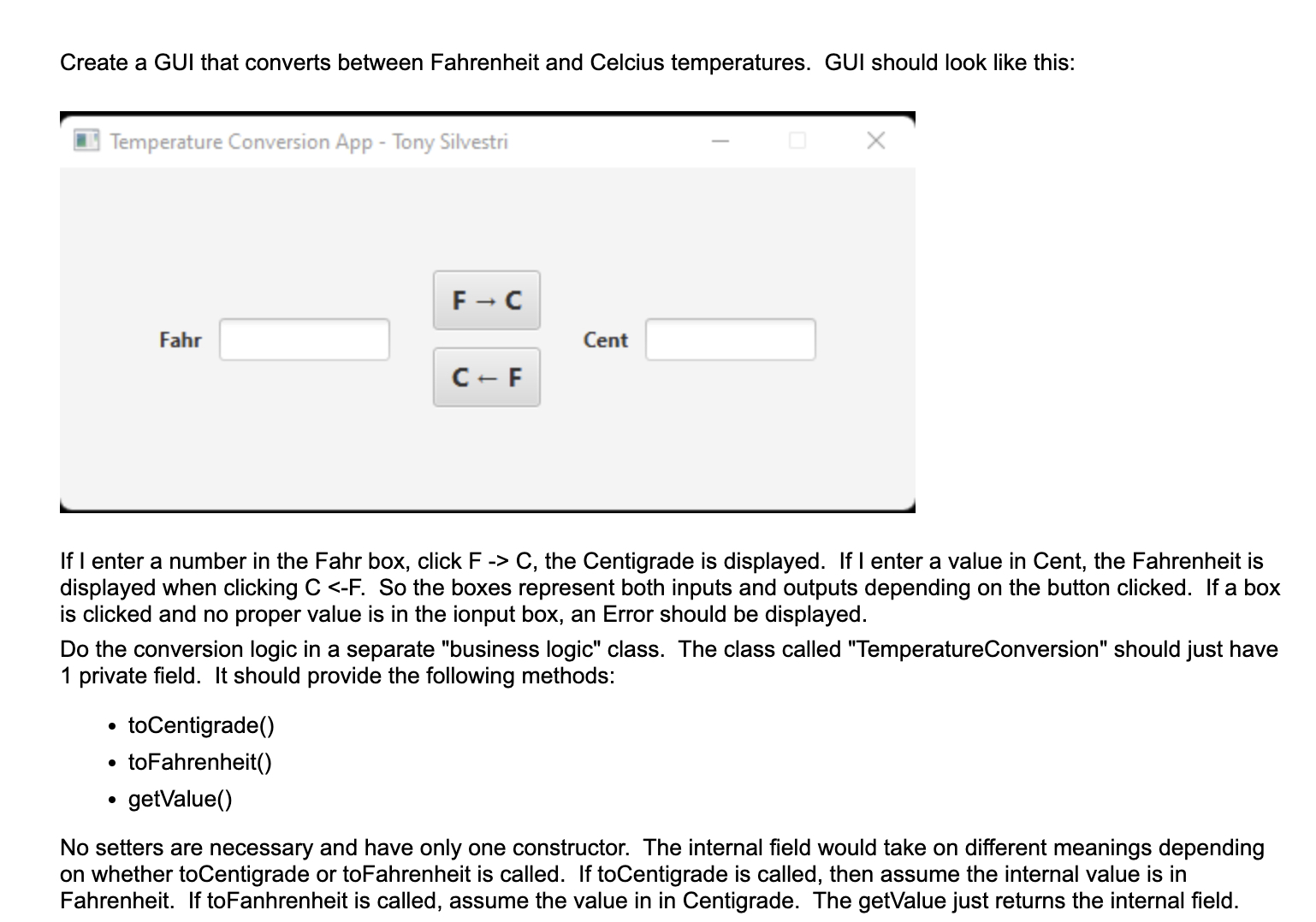
Question: Create a GUI in java that converts between Fahrenheit and Celcius Antemperatures. GUI should look like this: If I enter a number in the Fahr
Create a GUI in java that converts between Fahrenheit and Celcius Antemperatures. GUI should look like this: If I enter a number in the Fahr box, click F C the Centigrade is displayed. If I enter a value in Cent, the Fahrenheit is displayed when clicking C F So the boxes represent both inputs and outputs depending on the button clicked. If a box is clicked and no proper value is in the ionput box, an Error should be displayed. Do the conversion logic in a separate "business logic" class. The class called "TemperatureConversion" should just have private field. It should provide the following methods: toCentigrade toFahrenheit getValue No setters are necessary and have only one constructor. The internal field would take on different meanings depending on whether toCentigrade or toFahrenheit is called. If toCentigrade is called, then assume the internal value is in Fahrenheit. If toFanhrenheit is called, assume the value in in Centigrade. The getValue just returns the internal field. Use this javafx codegui for a quadratic equation as an example:import javafx.application.Application; import javafx.geometry.Insets; import javafx.geometry.Pos; import javafx.scene.Scene; import javafx.scene.control.Button; import javafx.scene.control.Label; import javafx.scene.control.TextField; import javafx.scene.layout.HBox; import javafx.scene.layout.VBox; import javafx.stage.Stage; public class QuadraticGUIApp extends Application private TextField createClearableTextField var textField new TextField; textField.setPrefWidth; Set a fixed width Add mouse pressed event handler to clear the text textField.setOnMousePressedevent textField.clear; return textField; private TextField createReadOnlyTextField var textField new TextField; textField.setPrefWidth; textField.setEditablefalse; textField.setFocusTraversablefalse; textField.setMouseTransparenttrue; return textField; private void calculateRootsTextField tfA, TextField tfB TextField tfC TextField tfRoot TextField tfRoot try var a Double.parseDoubletfAgetTexttrim; var b Double.parseDoubletfBgetTexttrim; var c Double.parseDoubletfCgetTexttrim; var q new Quadratica b c; var noOfRoots qnoOfRoots; if noOfRoots var r qgetRoot; var strRoot String.formatf r; tfRootsetTextstrRoot; var r qgetRoot; var strRoot String.formatf r; tfRootsetTextstrRoot; else if noOfRoots var r qgetRoot; var strRoot String.formatf r; tfRootsetTextstrRoot; else tfRootsetTextNone; tfRootsetTextNone; catch RuntimeException ex tfRootsetTextError; tfRootsetTextError; private VBox buildGUI Input TextFields var tfA createClearableTextField; var tfB createClearableTextField; var tfC createClearableTextField; Output TextFields var tfRoot createReadOnlyTextField; var tfRoot createReadOnlyTextField; Button for Calculation var calc new ButtonCalculate Roots"; calc.setOnActionevent calculateRootstfA tfB tfC tfRoot tfRoot; var inputs new HBox; inputs.setAlignmentPosCENTER; inputs.getChildrenaddAllnew LabelA tfA, new LabelB tfB new LabelC tfC; var controller new HBox; controller.setPaddingnew Insets; controller.setAlignmentPosCENTER; controller.getChildrenaddcalc; var outputs new HBox; outputs.setAlignmentPosCENTER; outputs.getChildrenaddAllnew LabelRoot tfRoot new LabelRoot tfRoot; var gui new VBox; gui.setAlignmentPosCENTER; gui.getChildrenaddAllinputs controller, outputs; gui.setStylefxfontweight: bold;"; return gui; @Override public void startStage primaryStage var gui buildGUI; var scene new Scenegui; primaryStage.setScenescene; primaryStage.setTitleQuadratic Equation Solver Tony Silvestri"; primaryStage.setResizablefalse; primaryStage.show; public static void mainString args Application.launchargs;
Step by Step Solution
There are 3 Steps involved in it
1 Expert Approved Answer
Step: 1 Unlock

Question Has Been Solved by an Expert!
Get step-by-step solutions from verified subject matter experts
Step: 2 Unlock
Step: 3 Unlock
 Study Help